

Troubleshooting
Find the symptom, read the cause and the fix. The list runs from an empty dashboard to widgets that show nothing.
The dashboard is empty after install
The example bookmarks may have been removed. Add bookmarks with & or +, or import a browser file under Config → Data & backups.
The dashboard says "Host not allowed"
A write token is set and the address you opened is a public name nextDash does not know. Add the name to NEXTDASH_ALLOWED_HOSTS (Security and self-hosting › The write token) and restart, or open nextDash by its IP address or a private name instead.
The dashboard does not load
A toast offers Reload. Check that the server runs and that /api/pages, /api/settings and /api/bookmarks answer. Broken device settings in the browser fall back to the server's settings.
A change in another tab does not show
Open dashboard tabs poll GET /api/data-revision and refresh when bookmarks change. If a sync fails, use Retry on the toast.
A shortcut does not open its bookmark
- Another bookmark may use the same shortcut — the Bookmarks view's Health filters list shortcut conflicts.
- With the cursor on the grid,
g,j,k,tandxkeep their grid meaning; use search for those shortcuts. - Check Typing a bookmark shortcut under Behavior → Keyboard & search — it may be set to wait for a pause or for Enter.
- Focus must not be in a text field.
Bookmarks seem to be missing
Usually a filter: a tag view (Escape leaves it), Shift + F, a filter in the Bookmarks view's rail, or a limit on items per category. Deleted bookmarks are in the trash for 30 days.
An import says "0 new"
Every address already exists on the chosen page, or the file has no http(s) links.
A bookmark with a private address is refused
The address is localhost, 192.168.x.x or another private host while Allow localhost & private-network bookmarks is off (Behavior → General).
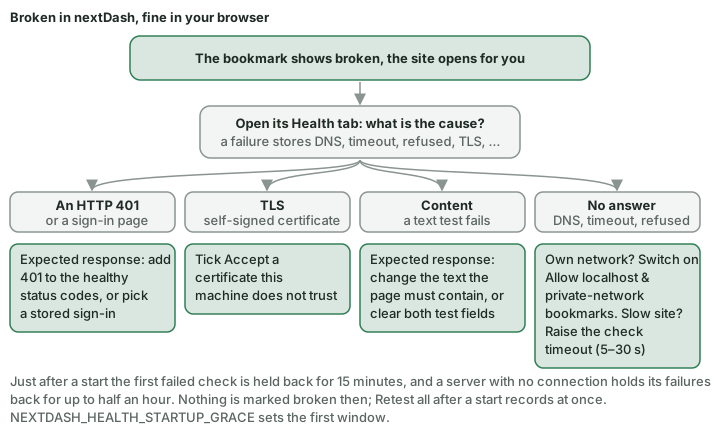
A self-hosted service shows as broken
It probably needs a sign-in, or answers 401. On the bookmark's Health tab in the Bookmarks view, choose Expected response: add 401 to the healthy status codes, or pick a stored sign-in (Checks & health › Availability modes).
The colours look wrong after the system switched to dark
Hard-refresh once (Ctrl + Shift + R / Cmd + Shift + R) to drop JavaScript from an older release.
A new release does not seem to have arrived
An open tab keeps the files it loaded. Reload once.
The update check fails
The Version panel on Config → Overview and the bar in the What's new window say why the check for a new release failed:
- GitHub's hourly request limit for this address is used up — without a token GitHub allows 60 requests an hour per public address, shared with everything else on your network. nextDash waits for the reset and asks again at the time it names. Set a token under Config → Containers → Updates → GitHub and the limit becomes 5000 an hour; the check uses it automatically.
- nextDash paused its outgoing requests for a moment — its own limit on outgoing requests; it asks again within a minute.
- Could not reach GitHub — the server cannot reach
api.github.com. Check its DNS, proxy or firewall. - GitHub did not answer as expected — followed by what GitHub said; try again later.
The Quick start bar does not appear
It slides in a moment after a fresh install's dashboard loads, on page 1 only and not on phones, and stays until every step is done or you close it for good. It is out of the way in Config and the other views, and while a modal is open. Show quick start again (Behavior → Privacy & sync → Onboarding) brings it back.
The weather does not show
Set a city, or choose Automatic (by IP), under Appearance → Date & weather, and check that weather is switched on. The Weather widget says so when no location is set.
The Calendar widget shows nothing
- Set Calendar feed URL (.ics) under Appearance → Date & weather. Use the private ICS address from your calendar app, not the calendar's web page.
- The server fetches the feed, so it must be reachable from the machine nextDash runs on.
- The feed is cached for 15 minutes; changing the address redraws at once.
The RSS widget shows nothing
- Give the widget at least one feed address (RSS or Atom), one per line.
- A web page instead of a feed is reported as such.
- The server fetches the feeds; each is cached for 15 minutes.
A system widget shows no figures
The tile names the missing step — usually a mount or an environment variable (Widgets › System widgets and what they need).
Browser notifications do not arrive
They need HTTPS in Safari and on iPhone and iPad, and nextDash on the home screen on iPhone and iPad. Permission is per browser.
The extension cannot save
- Check the server address and that nextDash runs.
- 401 — set the write token in the extension's settings.
- 409 — the shortcut is already used on that page.
- Refused writes and rate limits are logged when the Refused access channel is on (Logs → Activity trail, or
NEXTDASH_ACTIVITY_LOG=security).
No apps are offered
- No card at all — the Docker socket is not mounted, Suggest new apps is off (Config → Containers → View), or the first card was already answered; a new container is then asked about, added or proposed in the inbox as New apps says.
- An app is missing — it has a bookmark already, it answers with neither a page nor a sign-in page from where the server reaches, it is under Ignored apps, or it carries
nextdash.hide=true. A container behind a proxy nextDash cannot read the host from: give itnextdash.url(Containers › Apps it finds on its own). - The address is wrong — set Docker host address under Config → Containers → View → Links, or the
nextdash.urllabel.
The Containers view is missing or read-only
- Missing entirely —
NEXTDASH_DOCKER_SOCKETis not set, or the socket is not mounted; the Containers widget will say so too. - Visible but nothing can be started, stopped, updated or removed —
NEXTDASH_DOCKER_CONTROL=1is not set, or there is no write token in a build that expects one. - Socket present but every action fails — the socket may be owned by
root:root(common on Docker Desktop); addNEXTDASH_RUN_AS_ROOT=1. Remember that:roon the socket mount does not stop the daemon accepting writes on a writable socket — the protection is the control flag and the token, not the mount flag.
The Glances page is missing or shows nothing
See Glances › When something is wrong: the page needs a Glances 4 server, its address in Config → Glances and, on a private network, Allow localhost & private-network bookmarks switched on.