

Opening and editing bookmarks
Click a bookmark or press its shortcut letters to open it; the right-click menu and editing in place change it. Usage and recent bookmarks show what you reach for.
With the mouse
| Gesture | What it does |
|---|---|
| Click a bookmark | Opens it and counts the open. The row flashes briefly. |
Middle-click / Ctrl-click | Opens it in a new tab, and counts the open |
| Right-click a bookmark | The actions menu. Inside a selection it acts on the whole selection. Shift + right-click gives the browser's menu. |
| Drag a bookmark | Reorders it, or moves it to another category |
| Long-press a bookmark (~500 ms) | Edit in place |
| Hover a bookmark | The preview card |
| Click a category header | Folds or unfolds it |
| Long-press or double-click a category header | Renames it |
| Right-click a category header | Add a bookmark, rename, tiles, spread, icon, move, add, delete |
Drag the // in a category or widget title | Moves it: the page holds still and a dashed box shows where it lands. Drop it on the line between two columns to make it wide |
| Double-click a page tab | Renames the page, sets its emoji and colour |
Alt-click / Shift-click | Adds to, or extends, a selection |
Open in new tab follows Behavior → General; Ctrl/Cmd + Enter always opens a new tab.
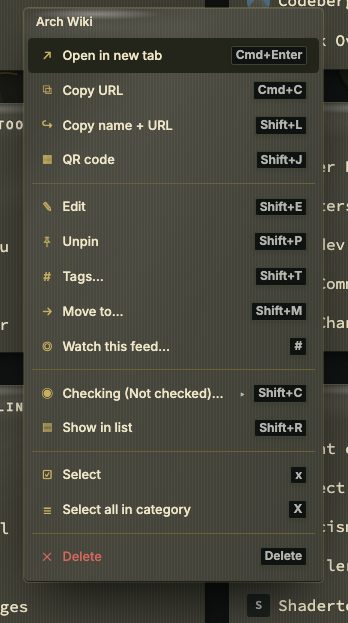
The right-click menu
| Item | Key | What it does |
|---|---|---|
| Open in new tab | Ctrl/Cmd + Enter | Opens it in the background |
| Copy URL | Ctrl + C | Copies the address |
| Share… / Copy name + URL | Shift + L | The system share sheet where the browser offers one (HTTPS only); otherwise copies name and address |
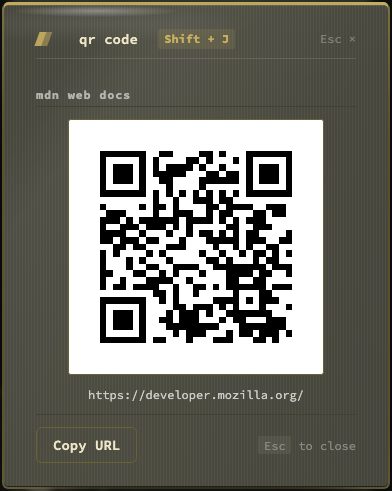
| QR code | Shift + J | Shows the address as a QR code, to open it on a phone; drawn in the browser, so the address goes nowhere. Copy URL in the window copies it |
| Edit | Shift + E | Edit in place |
| Pin / Unpin | Shift + P | |
| Tags… | Shift + T | The quick tag picker |
| Move to… | Shift + M | Another category or page |
| Checking | Shift + C | Off / Periodic / Monitor |
| Show in list | Shift + R | Opens the bookmark in the Bookmarks view, with its Health section open |
| Select / Select all in category | x / X | Starts a selection |
| Delete | Shift + D | Asks first; undo in the toast; the trash keeps it 30 days |
The menu also opens with Shift + F10 or the Menu key, beside the row.
TIP
A link on your phone. Select the bookmark and press Shift + J, or pick QR code in this menu, then scan the code with the phone's camera. On an inbox row the code holds the item's own link, as Share does. The code is drawn in the browser, so the address is not sent anywhere.
Editing in place
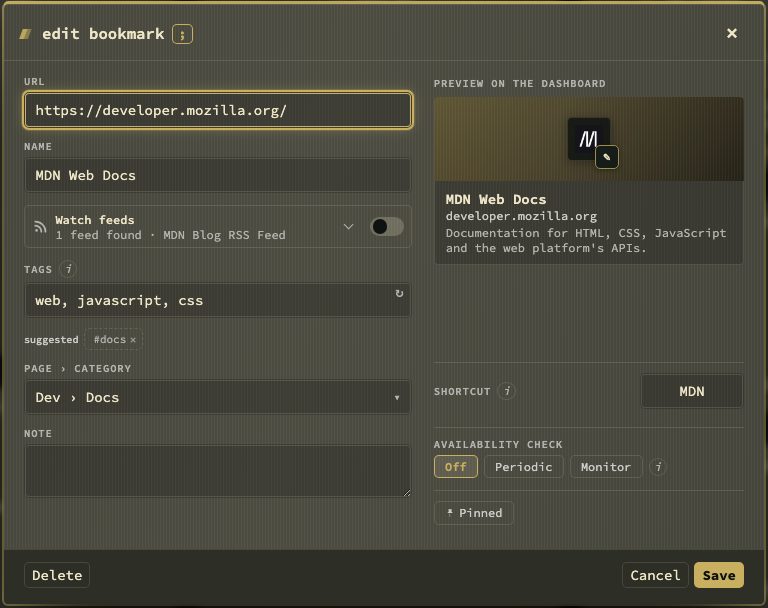
Shift + E, a long press, or Edit opens the bookmark form over the row, with the page dimmed behind it. Save or Ctrl + Enter writes it; Esc or a click outside closes it, asking first when something changed. While it is open, the grid keys, swiping and paste are paused. Deleting from the form asks first and offers undo.
Usage
Every open — from the grid, search, the recent panel or the Bookmarks view — adds one to the bookmark's open count and records the time. This feeds Recently opened, Most used, Stale, statistics and the Bookmarks view's Health tab. Opening the same site from the browser's address bar does not count. The counts are in your data files and travel with backups.
Recent bookmarks (*)
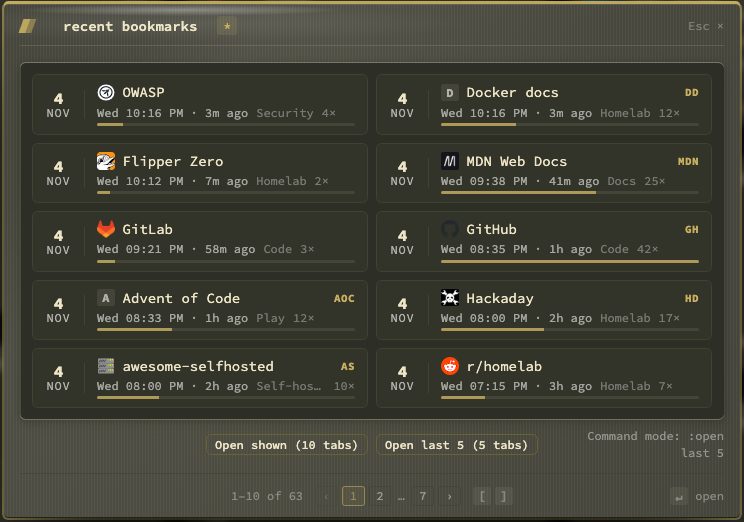
A sheet in the middle of the window with what you opened recently, from every page, newest first. Each bookmark is a tile, two across:
- a calendar block with the day and month it was last opened;
- the name and its shortcut;
- the weekday and time, and how long ago when it was less than a day;
- its category, or the name of its page when it lives on another page;
- how often it was opened, with a bar against the most opened.
Pointing at a tile shows the full date. Dates follow the app's language.
Ten tiles fit on a page; a pager in the foot says where you are ("11–20 of 34") and has the page numbers. ] or PageDown goes back to earlier bookmarks, [ or PageUp forward again. The arrow keys move from tile to tile, Enter opens. Open shown opens the tiles on screen in tabs, and Open last 5 the five newest when they are not the ones on screen. The sheet always opens on the newest page. :open last 5 opens several at once.
Hypr mode
Behavior → General → Hypr mode makes a click open the bookmark in a new browser tab and then close the installed app's window, the way an app launcher works. It pairs with nextDash installed as an app (Phones, tablets and the installed app).