

Inbox
The inbox holds links you saved but have not filed. Triage them one key at a time, or keep them in Unsorted until they earn a category.
The inbox holds links you want to keep before you decide where they go. Items live in data/inbox.json. A new install starts with ten example links in it — Caddy, Healthchecks, restic, Syncthing, Paperless-ngx, Immich, the Twelve-Factor App, SQLite, systemd and Julia Evans — none of them on the starter pages. Start with an empty page in the Quick start guide removes the ones you have not touched; Reset all data puts them back.
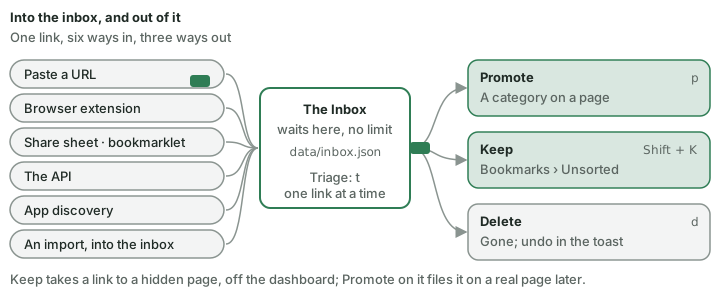
A link comes in from several places and leaves in one of three ways:
Getting links in
- Paste a URL on the dashboard and choose Save to Inbox — or set Always save to Inbox under Config → Inbox → Collecting → Paste destination.
- The extension — Save to Inbox in its popup, the right-click entry, or
Ctrl/Cmd + Shift + U. - The share sheet, the bookmarklet and
/add— see Browser extension and capture. - The API —
POST /api/inbox. - App discovery — with Propose in the Inbox under Config → Containers → View → New apps, a new container with a web page arrives here instead of on the dashboard: its name, a found on this server pill and its kind, with Promote (fills in the bookmark form) and Ignore (never proposed again) (Containers › Apps it finds on its own).
- An import — Config → Data & backups asks where an import goes; Into the inbox first sends it here, folders as tags (Data, backups and import › Backups & data).
A URL already in the inbox is not added again: a toast says Already in Inbox and the view jumps to it.
The inbox has no limit. It keeps every link until you deal with it, nothing is dropped to make room, and an import adds every link that is not there yet.
The view
Open it with Shift + I, the inbox icon or :inbox. The icon's tooltip says how many links are kept Unsorted.
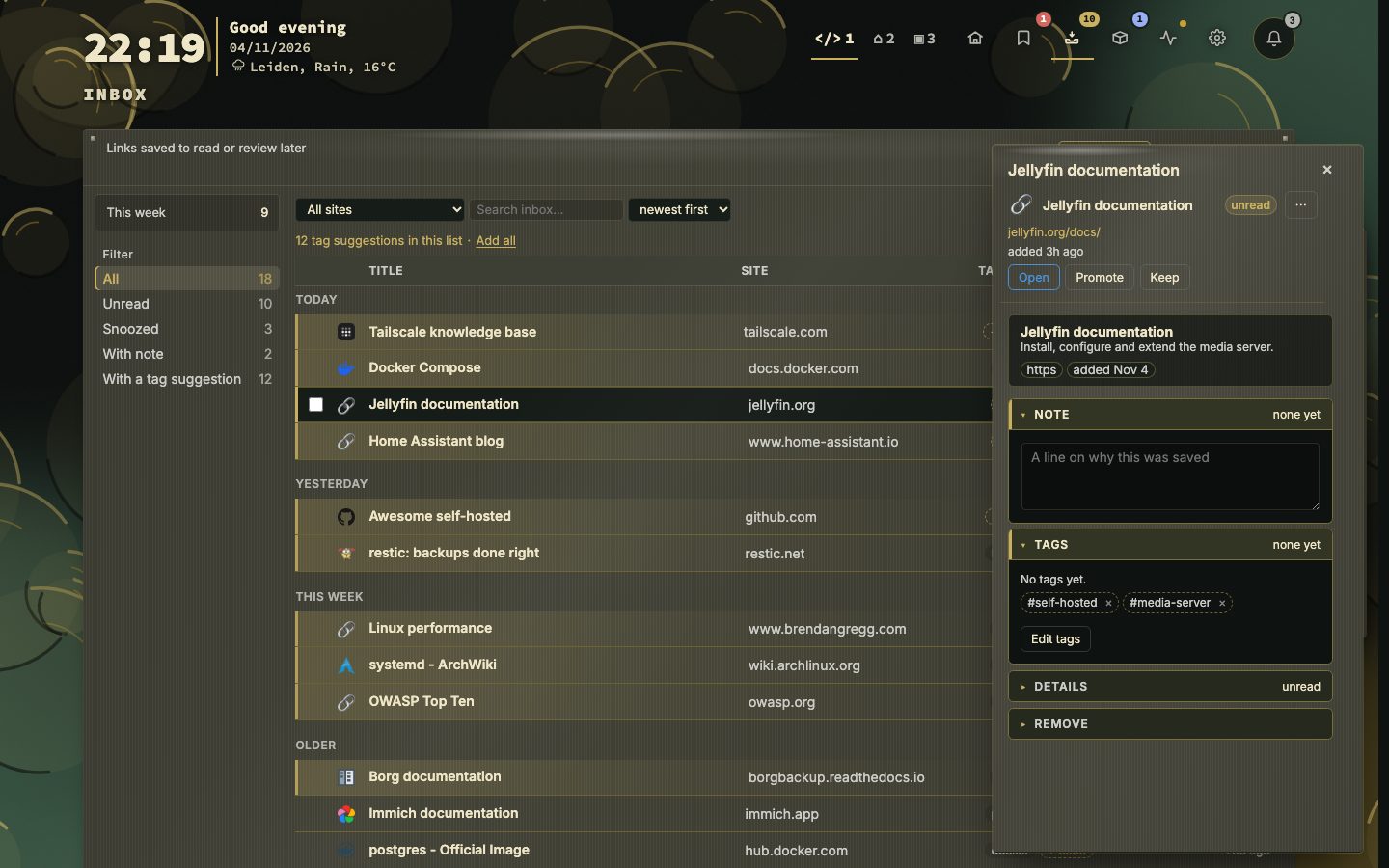
- A rail of filters on the left, each with its count: All, Unread, Snoozed and With note (Unread only when it differs from All, that is when some links are read; Snoozed and With note only when they hold something) — it can fold behind a Filters button (Config → Inbox → Panel & clicks). This week is a readout above them.
- Narrowing — by site, by tag (click a tag chip) and by search. Every count follows what is shown, and Mark all read becomes Mark shown read.
- Sort — newest first (default), oldest first, title or site. The column headings sort too: Title and Site A to Z, a second click Z to A; Added switches between newest and oldest first. Under Snoozed, which keeps its wake order, the headings do not sort.
- Rows are one line each and follow the app-wide density; the header stays in place. There are no tabs — a kept link goes straight to Bookmarks → Unsorted, not to a second list here (Keeping a link: Unsorted and Promote).
- The side panel, in the same style as the Bookmarks view's, shows the link in focus: Open, Promote, Keep, note, tags — suggested tag chips live in its Tags section — details and delete.
- The address keeps filter, sort, site, tag and search (
ib_filter,ib_sort,ib_dir,ib_domain,ib_tag,ib_q); filter, sort and site also return next time. - A key legend under the list shows the first six keys. N more keys opens the rest and Fewer keys closes them again; the choice is kept in this browser. The legend is for the mouse: the button is not a tab stop.
- The ℹ explains the inbox; a sentence under the toolbar explains the active filter.
Acting on links
| Key | Action |
|---|---|
j / k | Move |
g / Home / End | First / last |
Enter | Open the side panel |
o / Space | Open the link |
p | Promote to a bookmark |
n | Note |
r | Mark read |
Shift + K | Keep — to Bookmarks → Unsorted (undo in the toast) |
z | Snooze |
x | Tick and move on |
Shift + ↑/↓, Ctrl/Cmd + A | Extend / select all shown (again to untick) |
d | Delete (undo in the toast) |
u | Mark unread |
l | Edit tags |
t | Triage |
R | Reload |
Esc | Clear the selection, then back to the queue, then back to the bookmarks |
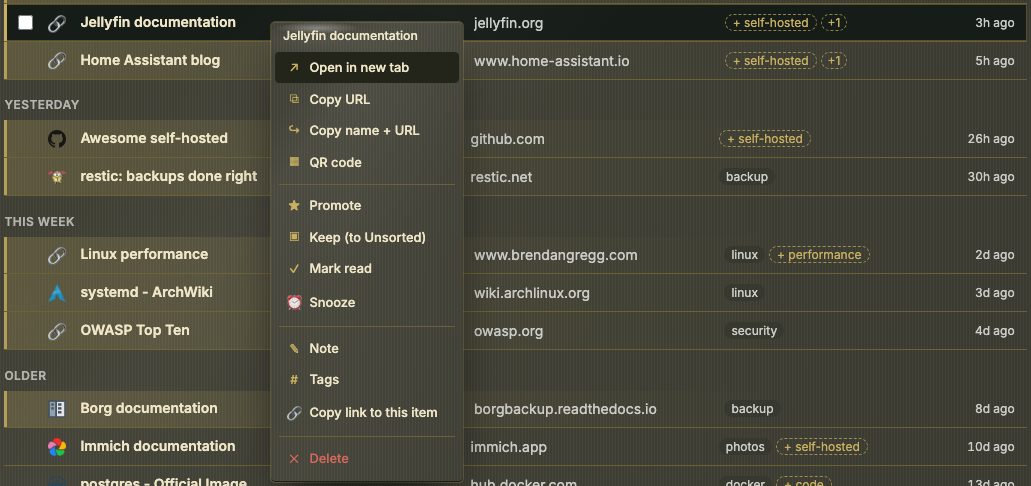
- Read — a link is unread until opened or marked read.
u, or the right-click menu, marks it unread again. - Snooze — three hours, tomorrow, the weekend, next week, or a date (waking at 09:00). A snoozed link is left out of every count; a line under the list says how many are asleep. Wake now brings one back.
- Notes and tags — plain-text notes; tags from the capture show as chips in the side panel's Tags section, and can be edited from there or the right-click menu.
- Promote — opens the bookmark form filled in, with every page and category. The inbox entry goes when the bookmark is saved.
- Keep — takes a link out of the queue for good, with its note and tags, and puts it on Bookmarks → Unsorted. A toast says "Kept — in Bookmarks → Unsorted", with Undo; the row flies toward the Bookmarks icon.
- Several at once — promote (to one page and category), keep, tags, open, copy links, mark read, snooze, delete — each with undo. Select all in the ⋯ menu ticks every link the filters leave, and reads Deselect all once they all are.
- Mark all read and Clear read — for the whole (shown) list. Clear read leaves snoozed links alone.
- Stats — how many links were added, promoted and deleted, and how long links wait.
- Export and import — CSV and JSON of what is shown; Import reads a JSON export back, skips links already there, and stops when the inbox is full rather than pushing older links out.
Triage
Triage (the button, t, or :inbox triage) takes you through unread links one at a time, in the same shape as Work through (The Bookmarks view › Work through and the header band).
1. Choose a pile. Triage counts unread links that are not snoozed. The fullest pile comes first:
| Pile | Holds |
|---|---|
| Waiting longest | Unread for over a week, oldest first |
| New this week | Saved in the last week, newest first |
| With a note | Links you left yourself a reason on |
| This list, as filtered now | Every unread link the list shows, in its order — always last |
↑/↓ choose, Enter starts, Esc leaves. Empty piles are left out; with nothing unread, triage says Nothing to triage.
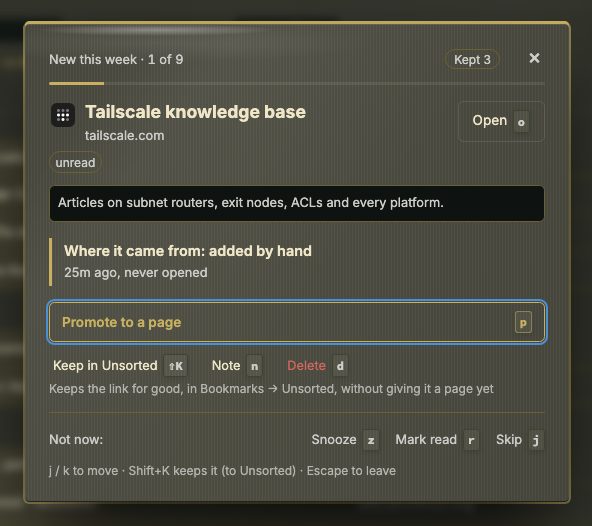
2. One link at a time. The card shows the pile and your place in it (Waiting longest · 1 of 3), the link, its preview, and Where it came from: how it arrived (the browser extension, a paste, another app, an import, or by hand), how long ago, whether it was ever opened, and your note.
| Key | Action | What it does |
|---|---|---|
p | Promote to a page | The main button. Opens the bookmark form to file it on a page; after the save, triage carries on at the next link |
Shift + K | Keep in Unsorted | Makes it a bookmark in Bookmarks → Unsorted without a page (Keeping a link: Unsorted and Promote) |
n | Note | Adds or edits the note; the card stays |
d / Delete | Delete | Removes it from the inbox |
z | Snooze | Picks when it comes back; it leaves the pile until then |
r | Mark read | Marks it read and moves on |
o / Enter / Space | Open | Opens it in a new tab and marks it read |
j / k | Skip / back | Next or previous card |
Esc | Back to the list |
3. The end of a pile. Triage counts what the run did — promoted, kept, deleted, snoozed, read — and offers the next pile that still has links, or Back to the inbox.
📷 Screenshot — a triage card
Keeping a link: Unsorted and Promote
There is no Kept tab any more. Keep — Shift + K, the row button, or the right-click menu — takes a link straight to a hidden page called Unsorted, in the Bookmarks view, rather than to a second inbox list. Shift + U or the address #unsorted opens the Bookmarks view there directly.
An Unsorted bookmark stays off the dashboard, the tag cloud, smart collections and the health summary. It is promoted onto a real page from its side panel (a primary Promote button) or its row menu, in the Bookmarks view — the same bookmark form Inbox's Promote uses, titled Promote bookmark, opening on the last page of the dashboard. Search still reaches Unsorted bookmarks while Search unsorted bookmarks (Behavior → Keyboard & search) is on, and the Unsorted widget shows them on a dashboard page, newest first, at random or by tag; its overflow row reads Open Unsorted. See The Bookmarks view › Unsorted and Promote for the full picture from the Bookmarks view's side.
Settings
Inbox settings moved to their own config section — Config → Inbox (Config › Config → Inbox): showing it in the header, quick-adding a pasted URL, keeping links without filing them, filing a kept link where its neighbours already are, the paste destination, and removing an inbox entry once it is promoted.
The first visit plays a four-step tour: the waiting room the inbox is, reading, snoozing and noting a link, the three ways a link leaves (promote, keep, delete) and where a kept link goes (Bookmarks → Unsorted), and triage with its keys. Tour, above the list, plays it again; so does Behavior → Privacy & sync → Onboarding.