Core concepts
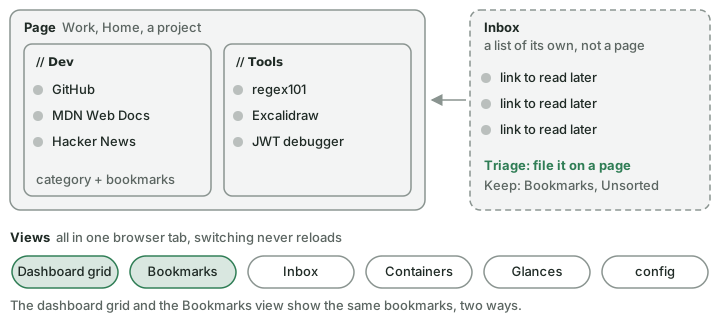
Everything is a page, a category on a page, or a bookmark in a category. Links you have not filed wait in the inbox, and five views share one browser tab.
Pages
A page is a separate set of categories and bookmarks — Work, Home, a project. Each page has a name, an optional emoji and an optional colour dot. Switch with 1–9 (and 0 for a tenth page), Shift + ←/→, the page switcher in the header, or the pages panel (,). A page remembers where you were scrolled.
Categories
A category is a section on a page. It has a name, an optional icon, a sort (manual, A–Z or Recent) and can be spread across several columns. Category names are unique per page; the same name on two pages is two categories. Bookmarks without a category collect under Other at the end of the page.
Bookmarks
| Field | Purpose |
|---|---|
| Name | The label. A bookmark without a name shows its host name. |
| URL | The address (http or https; private addresses only when allowed) |
| Page / Category | Where it is filed |
| Tags | Free labels, stored in lower case |
| Shortcut | One or two letters that open it from the dashboard |
| Note | Plain text, searchable |
| Pinned | Keeps it at the top of its category |
| Icon | Fetched automatically, or set by hand |
| Availability checking | Off, Periodic or Monitor — see Checks & health |
nextDash also records when a bookmark was added and last changed, how often it was opened and when last, and its preview (title, description, image) and health.
The inbox
The inbox holds links you want to keep before you know where they belong. It is a list of its own, not a page. A new install starts with ten example links in it, so there is something to triage. Keep sends a link to Bookmarks → Unsorted rather than filing it, for a link worth holding on to with no page yet. See Inbox.
Views
The dashboard has up to six views: the dashboard grid, the Bookmarks view, the inbox, the Containers view, the Glances page (once it is set up) and config. They are all part of one page — switching never reloads. Escape backs out to the dashboard grid, and the browser's Back button returns to the view you came from. Changing a filter inside a view is not a history step.
This manual calls the page of categories and widgets the dashboard grid, to keep it apart from the Bookmarks view — the library of every bookmark, with its own rail, list and side panel (The Bookmarks view).