

Browser extension and capture
The extension saves the current tab to a page or the inbox. Without it, the share sheet, a bookmarklet and a /add address do the same.
The extension
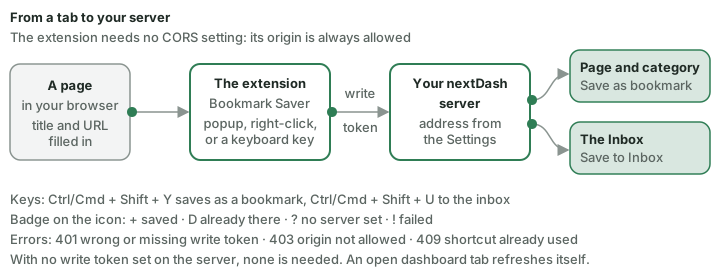
The nextDash Bookmark Saver in extension/ saves the current tab to a page or to the inbox (Chrome and Chromium).
Install: open chrome://extensions/, switch on Developer mode, click Load unpacked and choose the extension/ folder.
Set up: extension icon → Settings → your nextDash address, the write token if the server has one, and a default page.
Save:
- The title and URL are filled in. Add a shortcut (empty = a suggested free letter), a page and category, tags and a note, and save — or press Save to Inbox.
- An address you already have is reported, with Save anyway.
- After saving: Open in nextDash or Open Inbox in nextDash. An open dashboard tab refreshes itself.
- Right-click a page or link → Save to nextDash or Save to nextDash Inbox.
- Keyboard —
Ctrl/Cmd + Shift + Ysaves as a bookmark,Ctrl/Cmd + Shift + Uto the inbox. The icon badge reports + saved, D already there, ? no server set, ! failed.
The extension needs no CORS setting: its origin is always allowed. Errors: 401 wrong or missing write token, 403 origin not allowed, 409 shortcut already used on that page.
Capture without the extension
From a phone. Install nextDash as an app and it appears in the share sheet. Sharing a link saves it to the inbox and opens nextDash. Android sometimes sends the address inside the text; it is found either way. On iPhone, use the Apple Shortcut in integrations/, because Safari does not support the app's share target.
From any browser. Config → Help → Inbox → Saving a link from anywhere builds a bookmarklet with this install's address (and capture token). Drag it to the bookmarks bar.
From a script or launcher. One route does it:
GET /add?url=<address>&title=<optional title>[&token=<capture token>]It saves to the inbox with the usual duplicate check and answers with a readable page.
curl -s --get --data-urlencode "url=https://example.com/article" \
     --data-urlencode "title=An article" \
     https://nextdash.example.com/add >/dev/null
Use --data-urlencode: an address with its own ?a=1&b=2 breaks a hand-built query.
integrations/ holds a shell script (nextdash-add <url> [title]), two Raycast commands, a Dropzone action, a Ulauncher extension, and recipes for Alfred and Apple Shortcuts. They read NEXTDASH_URL (default http://localhost:8080) and NEXTDASH_TOKEN. See integrations/README.md.
Tokens. With no write token set, capture is open like everything else. With one set, /add and the share route need a token in the address: the write token, or better NEXTDASH_CAPTURE_TOKEN, which opens capture and nothing else.