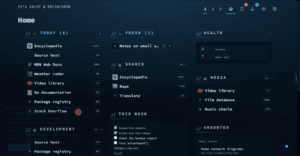
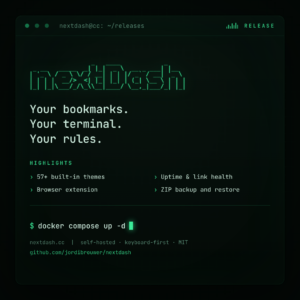
Categories, widgets and collections can be moved anywhere on the dashboard — wide, with the keyboard, or to another page, with Undo. Plus one grouped categories table, Reset all in the look studio, and a roomier What’s new.
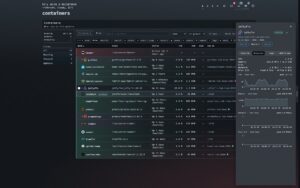
Ten releases between v1.15.1 and v1.17.0, in five days. Most of it is for people who run nextDash next to their containers: the Containers view grew up, Unraid has widgets of its own, and your services get their real icons. The theme browser also became a look studio. Here is what changed, by area. Containers The Containers table has sortable headings, CPU, RAM, Size and Restarts columns you can show or hide, and grouping by project, status, network or image. Shift+Y opens the view from the dashboard. Each container gets a timeline in its side panel: started, crashed with an exit code, turned unhealthy, updated, rolled back. The panel also shows the last five healthcheck results, and l opens a live logs window. nextDash follows Docker’s event stream instead of polling, so a crash the restart policy fixes within seconds still sends a notice. So does a container that stays […]
Your full bookmark list lived in Config, health had a view of its own, and the inbox had a third layout. In v1.15.0 they share one shape: a rail on the left, one-line rows in the middle, a side panel on the right. The Docker host nextDash runs on gets that same shape as a new Containers view. Source and downloads: github.com/jordibrouwer/nextdash — release notes: v1.15.0 on GitHub One collection, one view The Bookmarks view opens from the header icon or #bookmarks. Each row carries tags, shortcut, a health score and 30 days of opens, coloured by how the link is doing. The side panel has three tabs — Details, Health, Usage — on 1 2 3, and Details saves as you type. Group by page, category, site, status or tag. rows jellyfin.lab96 docs.example.org61 retired-service.io12 $ one line per bookmark — health in the glow, use in the bars, the […]
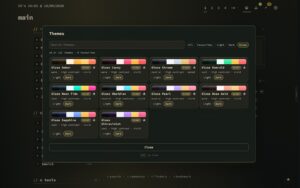
A theme in nextDash was thirteen colours. Nothing in it said whether those colours belonged on lacquer, on paper or on a terminal, so 218 of the 242 built-in themes were drawn flat and matte whatever their palette suggested. In v1.13.3 every theme also names a character, and brings the surfaces it was drawn for along with it. Source and downloads: github.com/jordibrouwer/nextdash — release notes: v1.13.3 on GitHub Twelve characters Lacquer, Glass, Frost, Aurora, Neon, Velvet, Enamel, Brushed, Carbon, Paper, Terminal, Ink. Each is an archetype that fills in the nine surface fields a theme leaves blank: how much light sits on a panel, how far a colour carries around it, how sharp its corners are, whether there is a grain. character Lacquer Glass Paper Brushed One palette, four characters: the same four colours, drawn on four materials. $ the archetype scales what the palette already works out — glass […]
The largest release so far, and most of it answers one question: where does a thing live. The header is one row, the buttons that floated over the grid have somewhere to stand, config opens on tiles, the bookmark list is a workbench, and a fresh install starts on a new look – with a one-minute tour for everyone who already knew where things were.
A short one. Every widget nextDash had read something it already held on your own disk: your links, your checks, your inbox. 1.7.0 adds the first two that look outward instead – at the weather, and at what is coming up in your calendar – along with a layout you can lock and a round of buttons that had stopped matching the themes around them. Source and downloads: github.com/jordibrouwer/nextdash Release notes: v1.7.0 on GitHub Two widgets that look outward Nineteen widget types now, in a new group of their own in the catalogue: What is happening around you? Weather puts current conditions beside a forecast – three days, five days, or the next 24 hours. It does not ask you where you are, because you have already said: it reads the location, source and units you set for the header’s own weather line. Asking a second time would have been […]
Two things happened in 1.6.0, and they turned out to be the same thing. A theme stopped being a list of colours and became a set of decisions about material — how solid a surface is, how much light bleeds off it, how faint the faint text is allowed to get. And Health and the Inbox stopped being two views that happened to look similar and became two views built out of one shell. Both are about the parts of the app that were being drawn twice, slightly differently, by nobody in particular. Source and downloads: github.com/jordibrouwer/nextdash — release notes: v1.6.0 on GitHub Two things change on screen the moment you are on 1.6.0, both deliberate, both explained below: 111 dark themes get a different backdrop, and Health looks substantially different. There is a note at the end about what that means for an install you have had running a […]
Five releases in two days — 1.4.5, sorry! Three patches under it, and 1.4.6 — and they all chase the same thread: things nextDash used to do quietly, on your behalf, without telling you. A bookmark’s preview picture used to be fetched by your browser, which meant the site you were dashboarding for found out you were looking at it. A custom widget’s API key went into the credential file and never came back, so a missing Bearer prefix looked identical to a wrong key. Both are fixed now, along with a handful of smaller things that had been sitting wrong since 1.4.4. Preview images stay on your server now — 1.4.6 Hovering a bookmark used to make your browser request that site’s preview image and favicon directly. Convenient, and also a quiet privacy leak: the site learned you were looking at your own dashboard, and a host that blocks […]
The last update version v.1.4.2.4 was the one where the dashboard stopped being only links: widgets in the grid, copies of pages kept where you can still read them, a theme browser instead of a listbox. This one is the half that comes after — making all of that behave like the parts that were already there. Nothing here changes what nextDash is. It is the round where a widget starts answering to the right-click and the keyboard the way a category always has, where Health can be told to stop reporting a condition you have already judged, where an Inbox backlog can actually be cleared, and where the browser’s Back button — which had never worked at all — takes you back. Source and downloads: github.com/jordibrouwer/nextdash — release notes: on GitHub Widgets stopped being decorations Widgets arrived as blocks you arranged in config. On the dashboard itself they were […]
This is the biggest thing I have shipped for nextDash: seventy changes across twelve areas, and four of them are new ground rather than a better version of something that was already there. The dashboard can hold blocks that are not bookmarks. A page can be kept somewhere you will still be able to read it after the site goes. The 214 built-in themes are a grid you can search instead of a listbox you scroll. And bookmarks can arrive from services that keep sending them, rather than only from a file you import once. 1.4.0 will open the What’s new window once after you upgrade. There is one behaviour change worth reading before you pull the image — it is under Upgrading, at the bottom. Source and downloads: github.com/jordibrouwer/nextdash — release notes: v1.4.0 on GitHub $ the grid in 1.4.0 — Uptime, Health trend and a Custom widget reading […]
v1.4.0 adds blocks to the grid that hold figures instead of bookmarks — thirteen of them reading data nextDash already keeps, and one Custom widget that reads a number out of any JSON endpoint. Twenty-eight services come pre-filled, so a Sonarr tile is four clicks.
nextDash 1.3.3 rebuilds the page you land on. The overview used to answer “what is new?” in different places at once, none of them well, while the news from the project itself sat below the fold on most screens. It is one list now, newest first. The form for adding a bookmark got the same treatment for the same reason — it had grown taller than a laptop screen, so the Save button was out of sight on the machine most people use. Behind those two visible changes sits something less glamorous and more important: an audit of the whole codebase. It turned up three separate ways you could lose bookmarks, a folder of your private data that was readable by anyone who could reach the app, and outage alerts that never left the building for an entire category of users. All of that is fixed here, and none of […]
$
● onlineuptime 76d24 postsutf-8wp 7.1.3
$ man shortcuts
/
focus the search field
jk
next / previous post
gG
first / last post
Enter
open the selected post
Esc
clear selection, or close this
?
toggle this help
j, k, g, G and Enter work while browsing a list of posts.