Until now the nextDash grid held exactly one kind of thing: links. Categories of them, smart collections of them, but links. Everything about the collection — how many are broken, what is waiting in the inbox, which certificate expires on Friday — lived in a view you had to go and open.
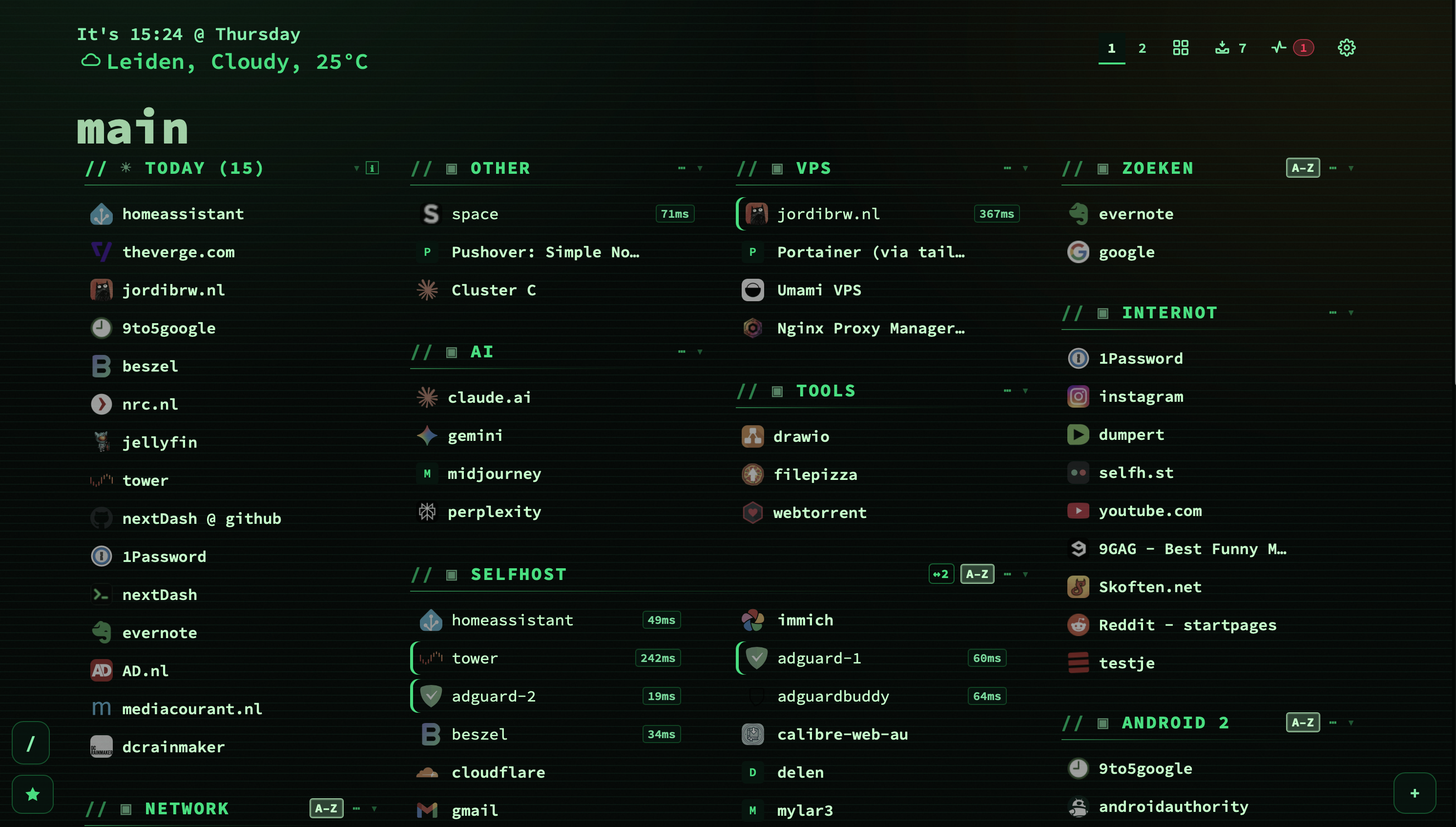
v1.4.0 adds a second kind of block. A widget sits in the grid among your categories, holds figures instead of bookmarks, and is dragged into place like anything else. Thirteen of them read data nextDash already keeps. The fourteenth — the Custom widget — reads a number out of any JSON endpoint you can reach, which is the one this post is really about.
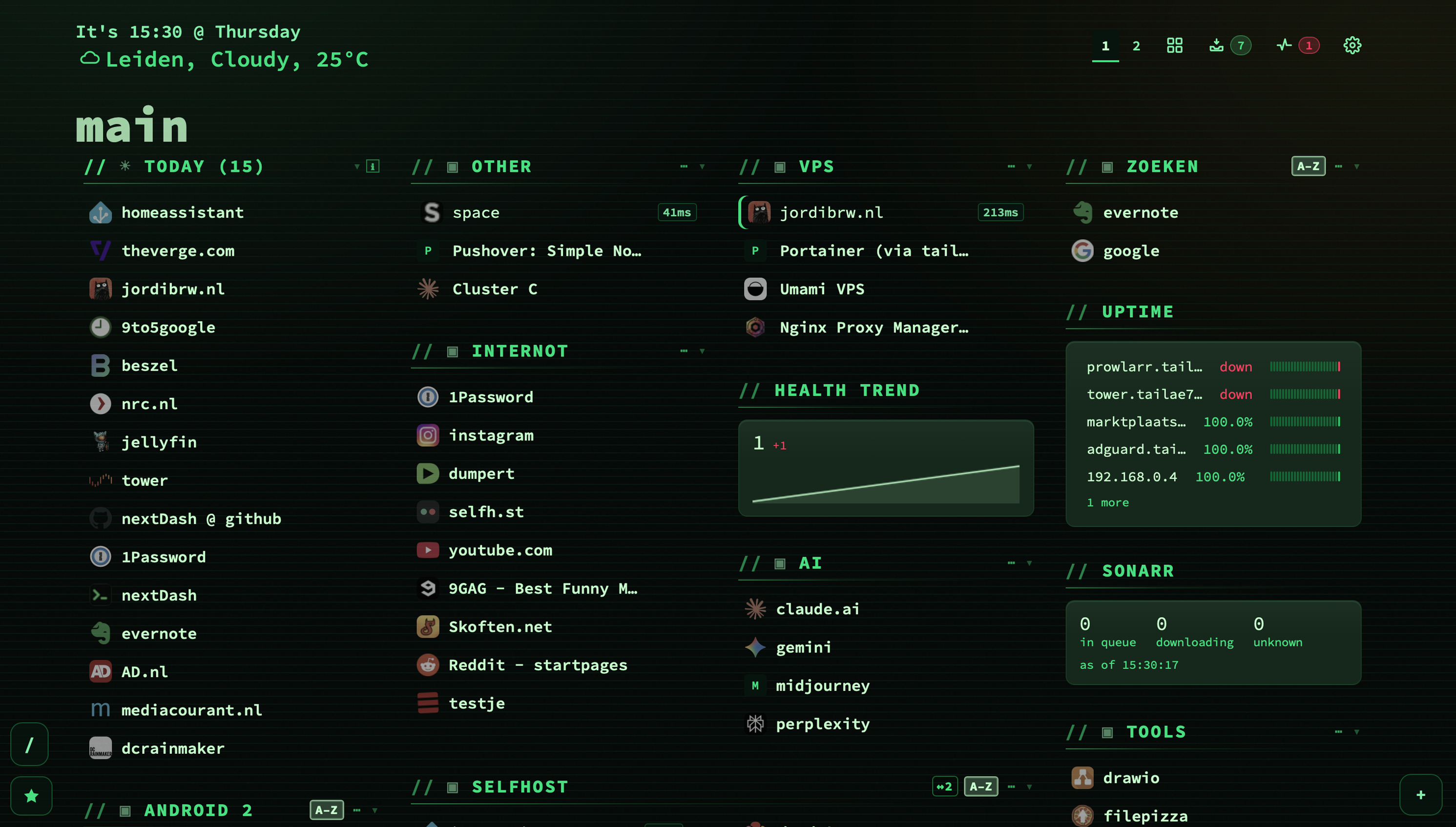
What a widget is
A third kind of block, not a new rendering model. The grid already drew blocks that were not categories, so a widget reuses the same column builder, the same drag handle and the same width rule. What it needed that smart collections did not is a place in the order: a smart collection always sits at the top, and a widget has to be able to live between two categories you chose.
So pages now store one blockOrder — categories and widgets together, in a single list. One list rather than two, because two lists saying where something sits is two lists that disagree the moment one gets written and the other does not. Dragging on the dashboard and the arrows in config write the same list, which is why they cannot drift apart.
- A widget can be one or two columns wide. Two at most: a widget that needs three columns is a view that has not admitted it yet.
- Switching one off keeps it in the order and out of the grid, so turning it back on returns it to where it was rather than to the end.
- Every figure on a tile opens the rows behind it — a count you cannot act on is a decoration.
- Lists that are cut to a row count say what did not fit, and that line leads to where the rest lives.
- Up to twenty-four widgets per page, because the grid has to draw all of them on every render.
Where to find them: Config → Widgets is a section of its own now, with two tabs — the widgets you have, and the kinds there are. Choosing a kind on the picker is the click that adds it. Where a widget sits is still arranged with the categories, under Config → Pages & tags → Categories, in the one list that holds both.
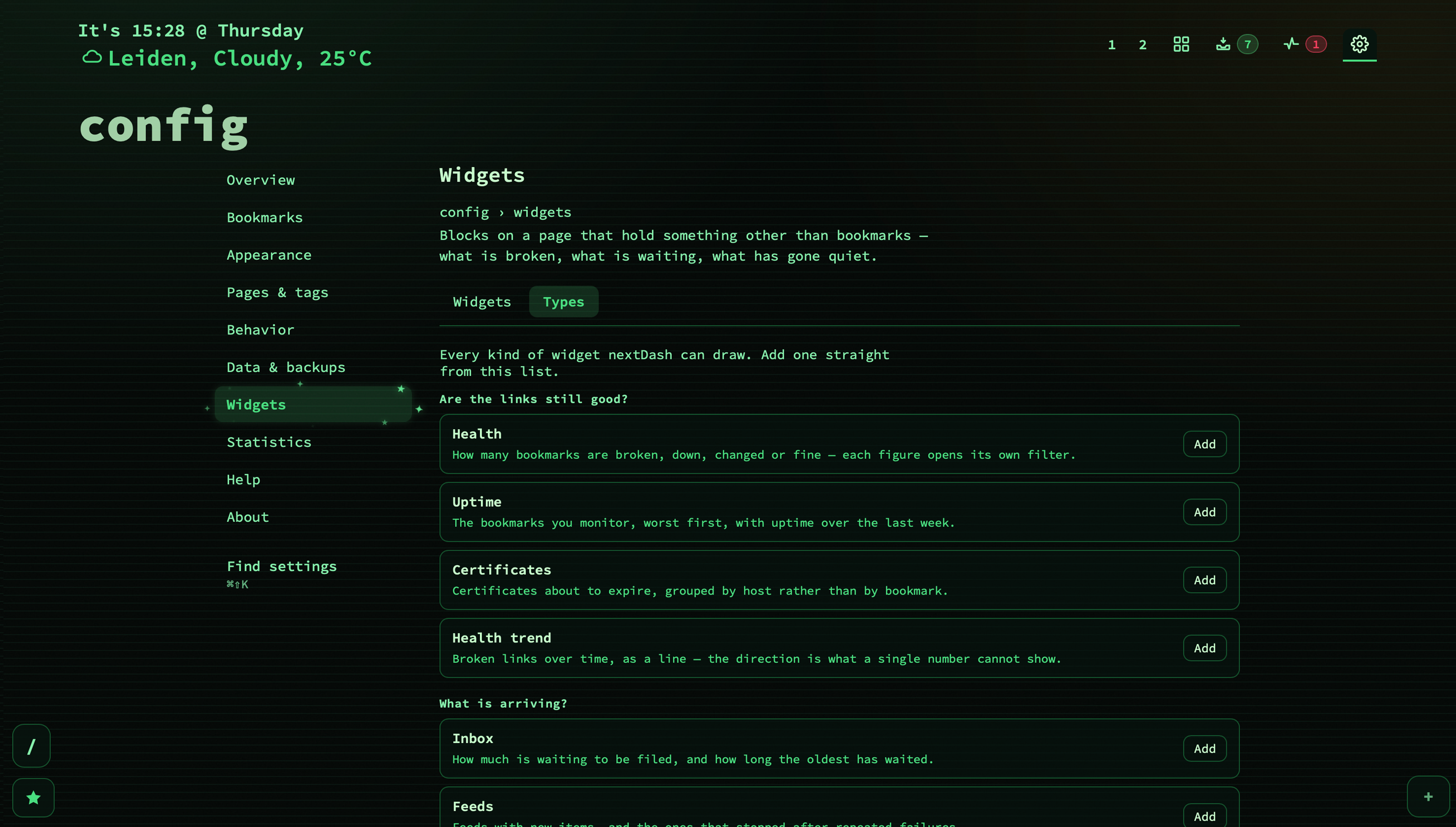
The thirteen that read what nextDash already knows
None of these fetches anything. They read the same report the health badge already requests, the inbox route, the trend file, the backup directory — data that is on your own disk and cannot change faster than the checks behind it. Each one exists because it answers a question nothing on an ordinary day was showing you.
| Widget | The question it answers |
|---|---|
| Health | What the health view reports, on the grid: broken, down, content failures, healthy. |
| Uptime | What you monitor, worst first, with a heartbeat per row. Only monitored bookmarks — the rest have no samples, and “—” for every service you never asked to watch is noise. |
| Certificates | What expires within N days, grouped by host. Ten bookmarks on one domain share one certificate and would otherwise be ten copies of one fact. |
| Trend | Broken links over time, with the direction beside the number. Twelve a month ago and four today is good news, and no single figure can say that. |
| Inbox | What is waiting, led by how long the oldest item has waited — the figure that says whether your inbox is a queue you work or a drawer you fill. |
| Feeds | Feeds with fresh items, and the half nobody could see: feeds that retired themselves after repeated failures and quietly stopped appearing. |
| Sources | What each import source last did. A failed import was previously found by wondering why nothing new had arrived for a week. |
| Neglected | The graveyard question in reverse: not which link died, but which one you stopped opening. Never-opened is weighed against when it was saved, so this morning’s bookmark is not neglected. |
| Archive | How much of the collection survives the page it points at — and specifically the links that are already broken with nothing kept, which is the moment a page is actually lost. |
| Trash | What is waiting in the trash and when it leaves. Retention deletes on a timer, and a timer nothing displays is a deletion nobody agreed to. |
| Unchecked | The blind spots: never checked, checked long ago, or checking switched off. Health reports what the checks found, which says nothing about what they never looked at. |
| Duplicates | The same address stored more than once. The server already computes it; without a tile it is only found by going looking. |
| Backups | How old the newest automatic backup is and whether the last run failed — the one figure that is worth nothing until the day it is worth everything. |
Each type declares its own settings, and the row folds open with them rather than covering the tile in a dialog. Which settings differ, because the question differs: Uptime and Neglected are where “which bookmarks” belongs, Certificates has no bookmark filter at all, and Trend takes none either — filtering the line would change what it means.
The Custom widget: why there is no Sonarr widget
The obvious next request is a widget per service. It is also the request I am not going to grant, and it is worth saying why: a dashboard that grows a codepath per service ends up maintaining one thing per upstream release it does not control. Homepage ships around a hundred and sixty service widgets, and felt Pi-hole v6 rewrite its API. Glance ships six and a custom-api.
Meanwhile, everything a dedicated Sonarr widget would need already exists in nextDash: a server that fetches, a credential store that keeps the key out of the browser, a cache, a path reader, a formatter. What was missing was never code. It was knowing that Sonarr keeps the queue size at totalCount under /api/v3/queue/status.
That is knowledge, not code. So it lives in a data file: twenty-eight services, each filling the Custom widget in and then getting out of the way.
Four clicks to a Sonarr tile
- Config → Widgets → Add, and pick Custom from the card grid.
- Open its settings and choose Sonarr from the service picker. The address, the three figures and the header name are filled in.
- Replace
sonarr.local:8989with your own host, and paste your API key into the sign-in block. - Save. The tile now reads in queue / downloading / unknown, and everything the preset filled in stays editable.
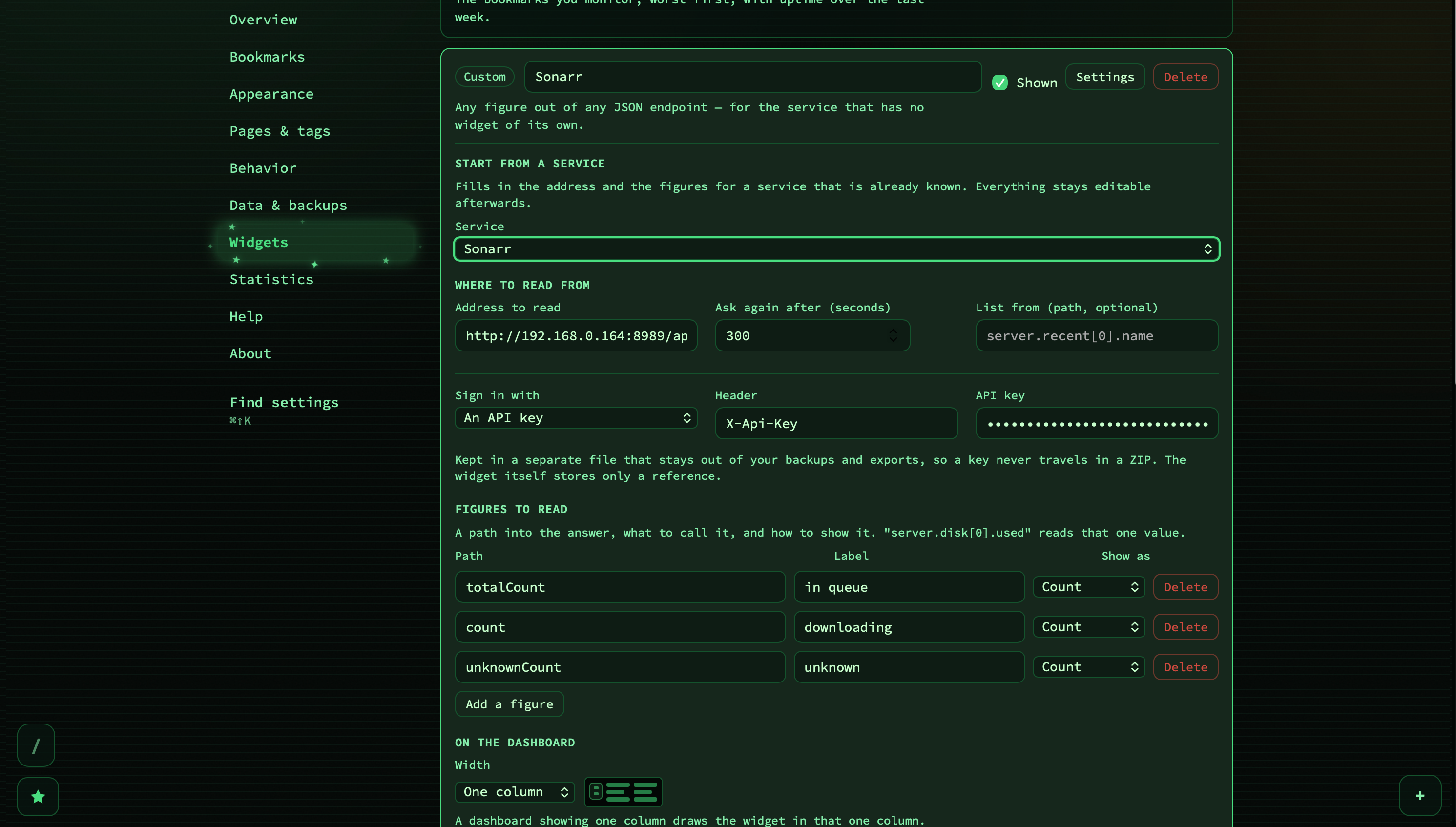
A preset is a starting position, not a kind of widget. It writes an address, a refresh interval and a list of figures, and then it is out of the way — the address is an ordinary text box afterwards and the figures are ordinary rows you can rename, reorder, delete or add to.
Two small conveniences fell out of building it. Applying a preset to a widget that already points somewhere keeps your host and replaces only the path, so moving a tile from Sonarr to Radarr on the same box is one click rather than a retype. And if you replace the sample host by hand and lose the path in the process — which is what happens, because typing an address ends at the host — the path is put back and the tile says so, rather than silently asking your service for its front page.
The twenty-eight, by group
Grouped by what you are looking at rather than alphabetically: whoever wants the *arr queue wants it beside the download client, not between AdGuard and Bazarr.
| Group | Services |
|---|---|
| Media & downloads | Sonarr, Radarr, Lidarr, Readarr, Prowlarr, Bazarr, Overseerr / Jellyseerr, Tautulli, Jellyfin / Emby, Plex, Immich, qBittorrent, SABnzbd, NZBGet |
| Network | Pi-hole v6, Pi-hole v5, AdGuard Home, Traefik, Speedtest Tracker |
| System | Proxmox VE, TrueNAS, Glances, Syncthing |
| Apps | Nextcloud, Paperless-ngx, Home Assistant, Grafana, ntfy |
Each one knows its own path, the figures worth reading, and a one-line note about the credential to make — “Settings → General → API Key, as an X-Api-Key header” for the *arr family, basic auth for AdGuard Home and NZBGet, a key in the query string for Tautulli, SABnzbd and Pi-hole v5, nothing at all for Traefik, Glances, Grafana and ntfy. A few carry a shorter refresh where it makes sense: sixty seconds for download clients, an hour for a speed test that runs on a schedule anyway.
Nothing in that file executes and nothing in it is sent anywhere. A service that changes its API next month is one line to fix, not a Go handler and a release.
If your service is not in the list
Then you fill in the same three things the preset would have. This is the whole feature:
- An address that answers JSON, over http or https, with GET or POST. Nothing else — a tile that could PUT is a tile that changes something, which is not what a tile is for.
- Up to eight figures, each a dotted path into the response:
queries.blocked,data.memory.used,server.disk[0].used. Arrays take[n]. It is not JSONPath and not a query language — a path either names something or it does not, and “does not” is an answer the tile can show. - A shape per figure, from six:
count,bytes,percent,duration,relativeDateandtext. Between them they answer how many, how large, how full, how long, how long ago, and what does it say.
The formats do the boring work. count groups thousands and rounds rather than truncating. bytes picks its own unit. percent accepts both a ratio and a percentage, since both turn up in the wild, and prints one decimal — 43.7%, never 43.729183739999996%. duration turns a seconds count into 19d. relativeDate reads Unix seconds, milliseconds and the common date strings, telling seconds from milliseconds by magnitude rather than by asking you.
There is also a list variant: point itemsPath at an array and the tile prints its entries, up to twenty, instead of — or beside — the figures.
Signing in
The sign-in block sits in the widget’s own settings, so you type the key where you already are. Three shapes: a header (name plus value, which covers nearly every self-hosted API), basic auth (username and password, assembled into the header for you — nobody should be base64-ing anything by hand), or none.
What you type does not go into the widget. It goes into health-credentials.json — the same store the authenticated health checks use — which is 0600, deliberately kept out of the backup ZIP, and never handed back to a browser. The widget stores an id pointing at it, which is meaningless on its own. That is the same trade the import sources make with their tokens: a restored install has to be told the key again, rather than the key travelling in an archive to a NAS and into somebody’s Downloads folder.
The whole panel is built around a draft now. Nothing leaves it until you press Save, so a half-typed path is never stored and a widget cannot be left pointing at nonsense by walking away from the screen.
How often it asks
Five minutes by default, adjustable from thirty seconds to a day. There is a floor because a dashboard left open on a wall would otherwise become a load generator pointed at your own services, and the answer is cached per widget rather than per address — two widgets on the same endpoint may reasonably ask at different rates, and the one that asked for thirty seconds should not be served an hour-old answer because its neighbour asked for an hour. Change a setting and the cached answer is dropped, so the next draw is fresh rather than the next TTL.
When it goes wrong, it says what went wrong
“That answer is not JSON” is true and useless: it leaves you choosing between a wrong path, a wrong credential and a service that changed its format. So the tile names the cause instead — that address answered with a web page, not JSON — check the path, the service answered 401, no answer from that address, that address is not allowed. And a single path that stopped matching after an upstream change shows an em dash marked as missing rather than a blank, because a blank reads like a zero and zero is a fact.
What it deliberately will not do
No expression language, no arithmetic, no templating. The moment a config can compute, the config is a second product with its own bugs and no debugger — and a widget only ever needs a number out of a response, which is far less than an importer needs.
And the fetching happens on the server, not in your browser, for three reasons at once: a page cannot reach a LAN service across origins, a key sent from the browser is a key handed to every script on the page, and the route takes a widget id rather than a URL. That last one is the whole safety story — the address comes from what your install already stored, so the endpoint cannot be talked into fetching something by asking it to. Where a widget may reach is governed by the existing allow local bookmarks setting, through the same guarded client every other outbound request in nextDash uses. A credential is stripped if a host answers with a redirect somewhere else, and a widget’s address and credential id are withheld from the page’s blocks route unless the request carries your write token.
And they read as instruments now
One last pass worth mentioning, because it changed how the whole set feels. The tiles had grown three dialects — a list of figures, a grid of figures and a plain sentence — and within each of them the number, its label and the surrounding noise all weighed about the same. A dashboard is scanned rather than read, so none of it carried at a glance.
There is one figure vocabulary now: 21px against a 14px label, tabular numerals so columns of digits line up, hairlines binding the figures into one readout instead of four facts floating in open space. Empty tiles are quiet. And a nought is calm — every value used to be painted its row’s colour, so “0 kept, 4 lost, 0 died” was three alarm colours and you had to check all three to find the one that wanted you.
Widgets ship in nextDash v1.4.0, alongside the archiving work and the import sources. If your service is not among the twenty-eight and you get it working with the Custom widget, send me the address, the paths and the figures — that is exactly the shape a preset is, and adding yours is one line.