Your full bookmark list lived in Config, health had a view of its own, and the inbox had a third layout. In v1.15.0 they share one shape: a rail on the left, one-line rows in the middle, a side panel on the right. The Docker host nextDash runs on gets that same shape as a new Containers view. Source and downloads: github.com/jordibrouwer/nextdash — release notes: v1.15.0 on GitHub One collection, one view The Bookmarks view opens from the header icon or #bookmarks. Each row carries tags, shortcut, a health score and 30 days of opens, coloured by how the link is doing. The side panel has three tabs — Details, Health, Usage — on 1 2 3, and Details saves as you type. Group by page, category, site, status or tag. rows jellyfin.lab96 docs.example.org61 retired-service.io12 $ one line per bookmark — health in the glow, use in the bars, the […]
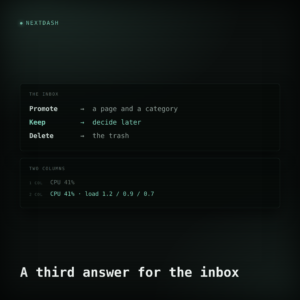
A link used to leave the nextDash inbox in one of two ways: it became a bookmark, or it did not. That works for links you can place, and not for the ones you want to hold on to without deciding where they belong. There is a third answer now — Keep — and a tab that holds what you kept, says how long each link has waited and where its neighbours were filed, and walks you through the pile one link at a time. The widgets changed too: a tile set to two columns says more, not the same thing larger.
Two things happened in 1.6.0, and they turned out to be the same thing. A theme stopped being a list of colours and became a set of decisions about material — how solid a surface is, how much light bleeds off it, how faint the faint text is allowed to get. And Health and the Inbox stopped being two views that happened to look similar and became two views built out of one shell. Both are about the parts of the app that were being drawn twice, slightly differently, by nobody in particular. Source and downloads: github.com/jordibrouwer/nextdash — release notes: v1.6.0 on GitHub Two things change on screen the moment you are on 1.6.0, both deliberate, both explained below: 111 dark themes get a different backdrop, and Health looks substantially different. There is a note at the end about what that means for an install you have had running a […]
nextDash 1.2.0 is already out! It is the keyboard release — typing on the dashboard now does only what you meant it to — and it is the release where three views stop claiming to know more than they do: the inbox was counting links it was not showing you, and a failed health check worked out exactly why it had failed and then threw that away. And this morning, 1.2.1 followed with a single fix in Health, which is covered at the end. Source and downloads: github.com/jordibrouwer/nextdash — release notes: CHANGELOG.md nextDash 1.2.0 — 16 August 2026 What you type arrives whole This is the fix that matters most, and it is worth explaining properly, because the old behaviour was subtly worse than it looked. Bookmark shortcuts fired the moment the typed text matched one exactly. Type github with a shortcut on git and the bookmark opened after three […]
Every release of nextDash up to now has carried a date instead of a version number: v2026.09.09, v2026.09.09.1, v2026.09.09.2, and so on, a new tag almost every day through a long stretch of active development. v1.0.0, released today, breaks that pattern on purpose. It’s the first release under semantic versioning, and it’s a deliberate milestone rather than an incremental one: after a long run of bug fixing and consolidation, the app finally feels finished and stable rather than in flux. From here, 1.x.0 releases carry new features and 1.0.x releases carry fixes — a distinction the date-based scheme never made. The comparison logic for the new numbering actually shipped a few point releases earlier, under v2026.09.09.3, so v1.0.0 is really the moment the switch was made official. What’s inside is almost entirely correctness work, and it follows one recurring shape: an operation that reported success for something it hadn’t actually […]
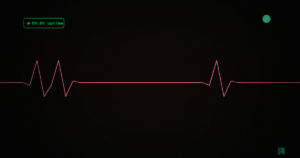
The dashboard header has quietly nagged at me for a while. The word “health” sat there as plain text, easy to miss, saying nothing about whether anything was actually wrong until you clicked it. In v2026.07.09 that text link becomes a small heartbeat icon, and it does something the word never could: it counts. When a bookmark goes offline or throws a warning, the icon carries a pill with the number, red for broken links and amber for warnings. When everything’s fine, it simply isn’t there. No noise, no empty badge waiting to be dismissed — just a signal that only shows up when it’s earned its place. It’s on by default now too, for new installs and for anyone whose settings never explicitly turned it off, though if you’d already switched it off yourself, that choice still sticks. The same icon treatment made its way onto the config page’s […]
$
● onlineuptime 76d24 postsutf-8wp 7.1.3
$ man shortcuts
/
focus the search field
jk
next / previous post
gG
first / last post
Enter
open the selected post
Esc
clear selection, or close this
?
toggle this help
j, k, g, G and Enter work while browsing a list of posts.