How nextDash compares
nextDash sits between a start page with a bookmark library and a server dashboard. Most dashboards in this list are built around the services on your network: tiles, widgets and status. nextDash starts one step earlier, with the links you collect, and then adds the server side on top of it.
That is why this page is long. The table is the short version: one row per thing you might want, one column per tool. Below it, six topics get a section of their own, because that is where nextDash goes further than the others, with a picture and a plain account of what the others do instead. At the end you will find where another tool is the better choice, because for some of you it is.
Every cell comes from the project's own documentation, README, compose file or source. A point the sources do not settle is marked not documented, never no.
At a glance
Out of 39 things you might want, how many each tool documents fully, and how many partly. Drawn from the table below. The rows are the ones we chose, and they lean to what nextDash does, so read the table for the rest.
The table
- Yes
- Partly
- No
- Not documented
- Not what it is for
| Feature | nextDash Start page and bookmarks | Homarr Dashboard | Homepage Dashboard | Glance Dashboard and feeds | Dashy Dashboard | Heimdall Application launcher | Homer Static dashboard |
|---|---|---|---|---|---|---|---|
| Running it | |||||||
| Stores its data in | plain JSON files | SQLite or PostgreSQL | its config files | its config file | its config file | SQLite by default | its config file |
| Containers | 1 | 1 | 1 | 1 | 1 | 1 | 1 |
| People | one, no accounts | users and groups, OIDC and LDAP | an optional shared password or OIDC login | an optional login, several users | an optional login, several users, OIDC | several users, optional passwords | a static site; it works behind an authentication proxy |
| Licence | MIT | Apache-2.0 | GPL-3.0 | AGPL-3.0 | MIT | MIT | Apache-2.0 |
| Memory it asks for | about 60 MB idle; the sample compose sets a 256 MB limit | at least 500 MB | Not documentednot documented | low; one binary under 20 MB | about 256 MB | Not documentednot documented | Not documentednot documented |
| Saving links | |||||||
| Add and edit in the browser | Yes | Yesdrag and drop, no YAML | NoYAML files only | Noa YAML file, no editor | Yesa built-in editor, or YAML | Yes | Noa YAML file |
| A bookmark library (tags, inbox, link health) | Yestags, an inbox, scheduled link checks | Partlya bookmarks widget; Linkwarden and Karakeep integrations | Partlylists of links | Partlya bookmarks widget | Partlysections of links, search by tags | Partlytags and pinned apps | Partlygrouped links with keywords |
| An inbox for links to sort later | Yestriage each link onto a page, or keep it | Not documentednot documented | Not documentednot documented | Not documentednot documented | Not documentednot documented | Not documentednot documented | Not documentednot documented |
| An Unsorted list for links with no page yet | Yessearchable, with a nudge when links wait too long | Not documentednot documented | Not documentednot documented | Not documentednot documented | Not documentednot documented | Not documentednot documented | Not documentednot documented |
| Tags with colours, a tag cloud | Yesa colour per tag, a tag cloud | Not documentednot documented | Not documentednot documented | Not documentednot documented | Partlytags to search by | Partlytags | Not documentednot documented |
| Import from another dashboard | YesHomepage, Dashy and Homer files | Not documentedonly its own backups | Not documentednot documented | Not documentednot documented | Not documentednot documented | Not documentednot documented | Not documentednot documented |
| On a phone | Yesinstallable web app, share sheet | Yesresponsive boards, touch editing, installable web app | Yesinstallable web app | Yesmade for small screens | Partlya web app with basic offline access | Not documentednot documented | Yesinstallable web app |
| News and feeds | |||||||
| Shows the headlines of a feed | Yes | Yesan RSS widget | Yesa Feed widget, RSS and Atom | Yesan RSS widget | Yesan RSS Feed widget | Not documentednot documented | Not documentednot documented |
| Finds the feed of a site you saved | YesWatch feeds: one switch per bookmark, no feed address to type | Not documentednot documented | Not documentednot documented | Not documentednot documented | Not documentednot documented | Not documentednot documented | Not documentednot documented |
| Counts what is new since your last visit | Yesper bookmark, with a news window and a reader; keeps no articles | Not documentednot documented | Not documentednot documented | Not documentednot documented | Not documentednot documented | Not documentednot documented | Not documentednot documented |
| Alerts for new entries in a feed | Yesthe feed.news event, to any webhook channel | Not documentednot documented | Not documentednot documented | Not documentednot documented | Not documentednot documented | Not documentednot documented | Not documentednot documented |
| Finding | |||||||
| Search from the keyboard | Yesa command palette, a key for every action | YesCtrl+K searches apps, boards, pages and commands, with search engines and bangs | YesQuick Launch: start typing | Partlya web search box with bangs | Yestype to filter, number keys for apps, bangs | Yessearches your tiles and the web | Yesfuzzy search, press / |
| Sums and unit conversion in search | Yes15% of 240, 5 km in mi; nothing leaves the browser | Not documentednot documented | Not documentednot documented | Not documentednot documented | Not documentednot documented | Not documentednot documented | Not documentednot documented |
| Finders: a short word searches one site | Yesyour own words, in the same search | Partlysearch engines and bangs | Partlysearch providers | Partlybangs | Partlysearch engines and bangs | Partlysearch providers | Not documentednot documented |
| Knowing your collection | |||||||
| Usage statistics of your own links | Yesopens over time, most opened, never opened; six tabs | Not documentednot documented | Not documentednot documented | Not documentednot documented | Not documentednot documented | Not documentednot documented | Not documentednot documented |
| Cleanup suggestions | Yesuntagged, opened once, no icon, still on http; a cleanup score | Not documentednot documented | Not documentednot documented | Not documentednot documented | Not documentednot documented | Not documentednot documented | Not documentednot documented |
| Export of the figures | YesCSV for every tab | Not documentednot documented | Not documentednot documented | Not documentednot documented | Not documentednot documented | Not documentednot documented | Not documentednot documented |
| Keeping | |||||||
| Backup of your setup | Yesautomatic backups, a 30-day trash, HTML and CSV export | Yesexport and restore as a ZIP (SQLite) | Partlyplain config files | Partlyplain config files | Yesexport, backup, optional cloud backup | Partlyimport and export of tiles | Partlyplain config files |
| Earlier layouts you can restore | Yesper page, with a preview of what a restore changes | Not documentednot documented | Not documentednot documented | Not documentednot documented | Not documentednot documented | Not documentednot documented | Not documentednot documented |
| See what you changed from the defaults | Yesa list with the value now and the default | Not documentednot documented | Not documentednot documented | Not documentednot documented | Not documentednot documented | Not documentednot documented | Not documentednot documented |
| Watching | |||||||
| Checks that services are up | Yesperiodic or on a server schedule, with response times | Partlya ping address per app, and Uptime Kuma and Gatus integrations | Yesping and site monitor, with response time | Yesa monitor widget, with response time | Yesstatus and ping checks, with response time | Not documentednot documented | Partlya Ping card, and cards for Uptime Kuma and Gatus |
| Stored uptime and response-time history | Yes30 days, per monitored bookmark | Partlyonly through an Uptime Kuma widget | Partlyonly through Uptime Kuma and Gatus widgets | Noshows current status and response time only | Noshows current status and response time only | Not documentednot documented | Partlyonly through Uptime Kuma and Gatus cards |
| Spots a page that answers 200 but is wrong | Yesexpected response, drift and soft-404 checks | Not documentednot documented | Not documentednot documented | Not documentednot documented | Not documentednot documented | Not documentednot documented | Not documentednot documented |
| Alerts when something goes down | Yesntfy, Pushover, Gotify, Telegram, Slack, Discord, push | Not documentedshows notifications from ntfy and Gotify; sends none | Not documentedshows messages from ntfy and Gotify; sends none | Noa red dot on a failing widget, no alerts | Not documentednot documented | Not documentednot documented | Not documentednot documented |
| Maintenance windows and quiet hours | Yesnothing is sent while you work on it | Not documentednot documented | Not documentednot documented | Not documentednot documented | Not documentednot documented | Not documentednot documented | Not documentednot documented |
| Warnings before a certificate or domain expires | Yesa notice and an alert, per bookmark | Partlyshows the expiry of certificates you upload, not of your sites | Not documentednot documented | Nono certificate or domain check | Partlya Domain Monitor widget for domain expiry | Not documentednot documented | Not documentednot documented |
| Signed webhooks to other programs | Yeshealth.down, health.up, expiry events, feed.news | Not documentednot documented | Not documentednot documented | Not documentednot documented | Not documentednot documented | Not documentednot documented | Not documentednot documented |
| Your server | |||||||
| Docker containers | Yesonce you allow it: start, stop, update, roll back, logs | Yesstart, stop, restart, remove, logs | Partlystatus and stats | Partlystatus | Not documentednot documented | Not documentednot documented | Partlycounts, and image updates, through cards |
| Finds your apps by itself | Yesfrom running containers, steered by labels | Partlyan onboarding scan of running containers, and labels | Yesfrom Docker labels | PartlyDocker labels for its widget | Not documentednot documented | Not documentednot documented | Not documentednot documented |
| Knows which bookmark belongs to which container | Yesfour ways to match, and a mark on the row | PartlyAdd to Homarr turns a container into an app | Not documentednot documented | Not documentednot documented | Not documentednot documented | Not documentednot documented | Not documentednot documented |
| Finds waiting image updates | Yesa filter, a badge, update one or a whole stack | Partlythrough a What is Up Docker widget | Partlythrough a What is Up Docker widget | Nono update check | Not documentednot documented | Not documentednot documented | Partlythrough a What is Up Docker card |
| Docker disk use | Yesa Disk tab: images, volumes, build cache | Not documentednot documented | Not documentednot documented | Not documentednot documented | Not documentednot documented | Not documentednot documented | Not documentednot documented |
| Glances | Yesa page of its own: history, incidents, a forecast for filling disks, several hosts | Partlytwo widgets: resources and disk health | Partlya widget with many metrics and a graph | Noits docs say support is planned | Partlya family of widgets, with history charts | Not documentednot documented | Partlya card: CPU, memory, swap, load |
| Service integrations | 51 widget kinds, and 41 services for the Custom widget | 90 integrations | 164 service widgets | 28 widget types, including a Custom API widget | about 100 widgets for services and system stats | 155 apps with live stats | 57 smart cards |
| Show a widget only at set times | Yesbetween two times and on chosen days, for every kind | Not documentednot documented | Not documentednot documented | Noonly show-failing-only and hide labels | Not documentednot documented | Not documentednot documented | Not documentednot documented |
| Looks | Yes192 theme families, 266 backdrops | Partlyper-board background, colours and custom CSS | Yeslight and dark, 22 colours, custom CSS and JS | Yesthemes, your own colours, custom CSS | Yes40+ themes, a colour editor, custom CSS | Partlybackground image, custom CSS | Yesthemes, colours, custom CSS |
| Assistants | |||||||
| An assistant inside the app | YesClaude, OpenAI or your own server, such as Ollama | YesOpenAI-compatible endpoints, Shift+A | Not documentednot documented | Not documentednot documented | Not documentednot documented | Not documentednot documented | Not documentednot documented |
| You approve every change it proposes | YesApply or Skip per change; deletes one at a time | Partlychanges need approval | Not documentednot documented | Not documentednot documented | Not documentednot documented | Not documentednot documented | Not documentednot documented |
| It answers from its own manual | Yesthe manual and README that ship with your install | Not documentednot documented | Not documentednot documented | Not documentednot documented | Not documentednot documented | Not documentednot documented | Not documentednot documented |
| An MCP server for other AI tools | Yesread and edit bookmarks, read Health; control containers only if you allow it | Yesan API key or OAuth; tools for integrations and widgets | Partlyedits config files; off by default | Not documentednot documented | Not documentednot documented | Not documentednot documented | Not documentednot documented |
| Latest release | v1.25.0, 3 Nov 2026 | v2.10.1, 30 Oct 2026 | v2.7.0, 23 Oct 2026 | v0.8.7, 15 Oct 2026 | 4.9.0, 23 Oct 2026 | v2.8.4, 29 Oct 2026 | v26.08.3, 30 Aug 2026 |
Where nextDash goes further
Statistics of your own collection
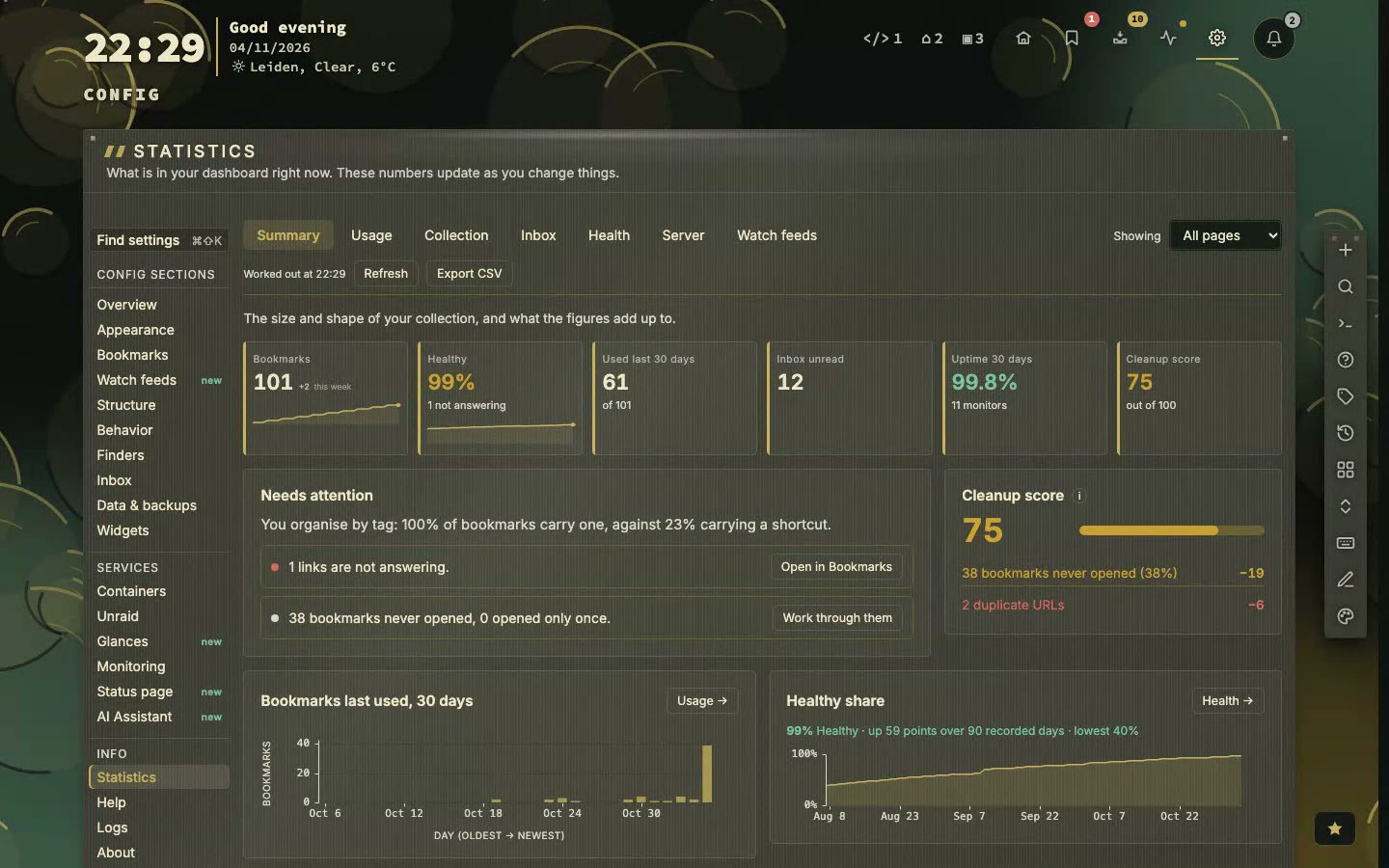
Config, Statistics counts what you have and what you use. Everything is worked out from the data on your own server, so nothing leaves it.
- Six tabs, each with six figures: Summary, Usage, Collection, Inbox, Health and Server.
- Usage shows opens over time, when in the day you open bookmarks, how concentrated your use is, and your most opened and never opened links.
- Collection shows how it grew, the age of it, top domains, coverage of icons, tags and notes, and cleanup candidates: untagged, opened once, no icon, still on http.
- Summary lists only what needs attention, each line with a button, and gives a cleanup score and what lowers it.
- Every tab exports to CSV.
What the others do. None of the six documents statistics about your own links. Homarr and Dashy have widgets that show statistics of other services (Umami analytics, code statistics), and Homepage shows Docker statistics. A count of how often you open a link is not in any of their documentation.
Link health with a memory
Every bookmark can be set to Off, Periodic or Monitor. A monitored bookmark is checked by the server on its own schedule, from five minutes to a day, so it keeps being checked when no browser is open.
- Thirty days of history per monitored bookmark: uptime, response times and outages.
- Expected response and drift catch the page that still answers but says something else, including the 200 that says not found.
- Certificates and domains are watched, and a warning comes before they expire.
- Alerts go to ntfy, Pushover, Gotify, Telegram, Slack, Discord or a push on your phone, with quiet hours and maintenance windows, so a planned restart does not wake you.
- Signed webhooks (health.down, health.up, health.cert-expiring, health.domain-expiring) let Home Assistant, n8n or a script react.
What the others do. Homepage, Glance and Dashy show whether a service answers, with the response time, on the page itself. Homarr and Homer lean on Uptime Kuma or Gatus for history. Dashy has a Domain Monitor widget for domain expiry. None of the six documents stored history of its own checks, drift detection, maintenance windows or alerts that it sends itself.
An inbox, and an Unsorted list
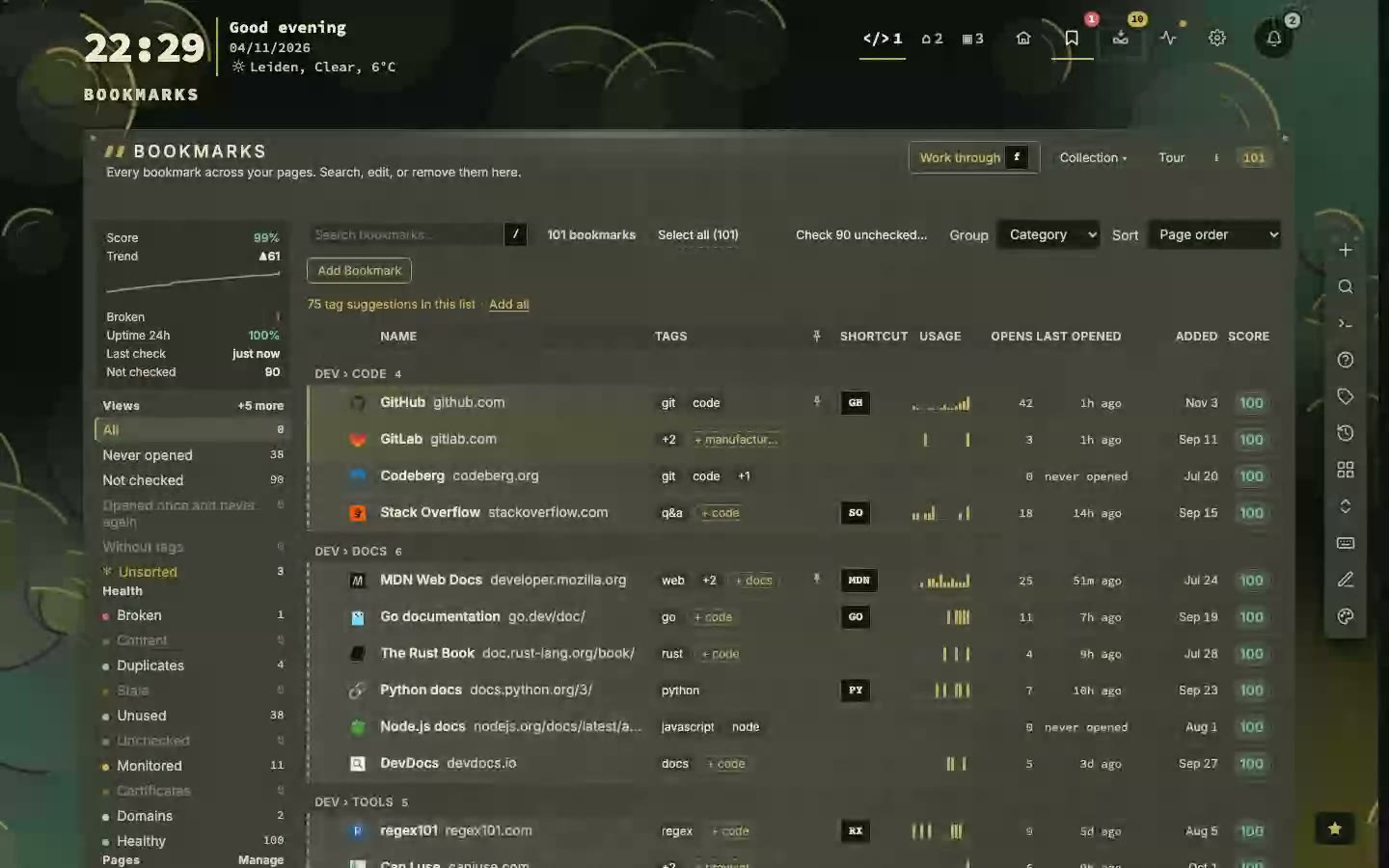
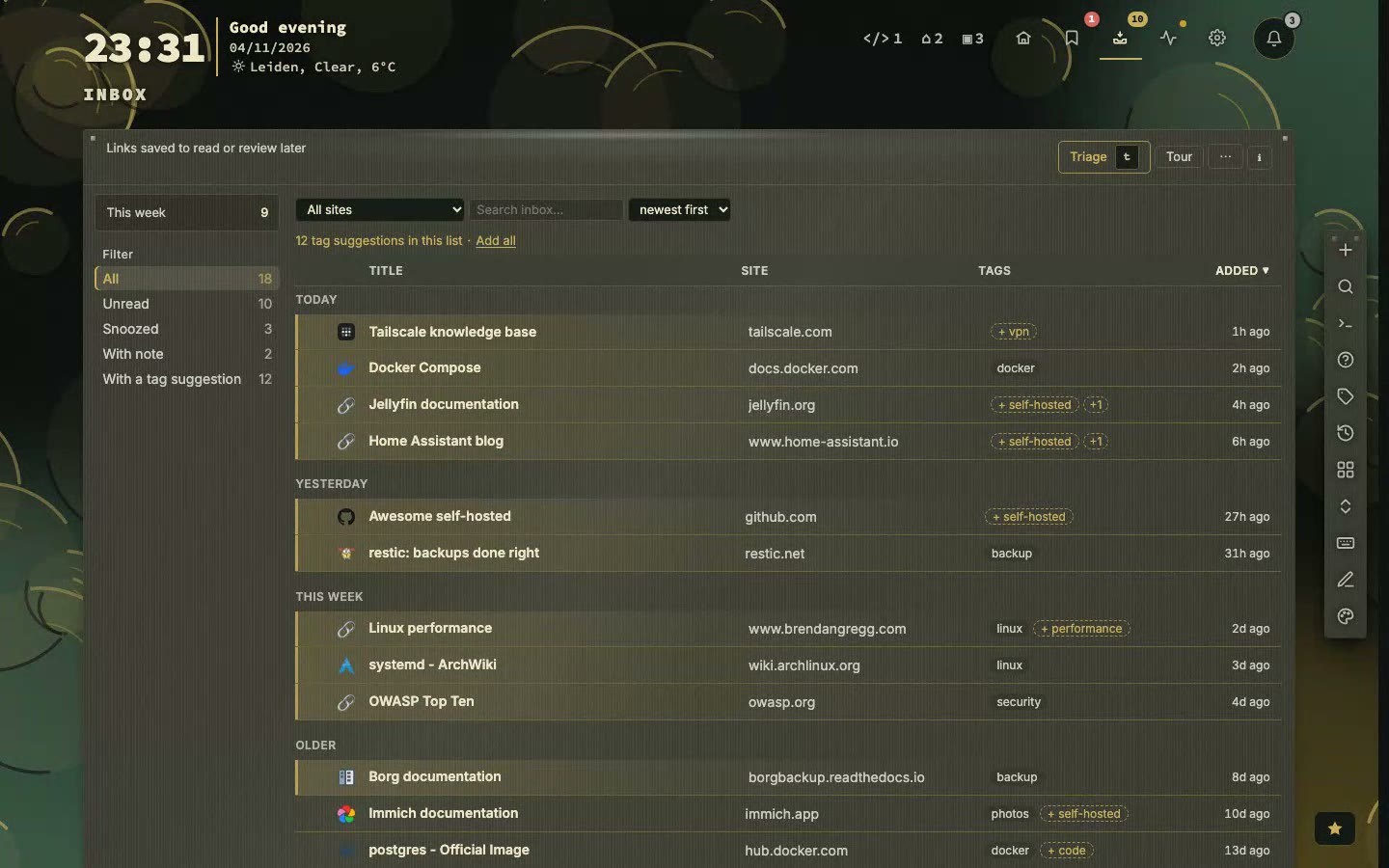
The inbox holds links you want to keep before you know where they belong. It is a list of its own, not a page. Triage files a link on a page. Keep sends it to Bookmarks, Unsorted, for a link worth holding on to that has no page yet.
- Promote gives an Unsorted bookmark a page when you know where it goes, through the same form as any new bookmark.
- Search reaches Unsorted by default, and Shift+U opens it, so nothing you kept gets lost.
- A card says so when ten or more kept links have waited over a month. It never files or deletes anything itself.
- Statistics counts the inbox: the flow per day, how long items wait, where they came from and how long triage takes.
What the others do. None of the six documents an inbox or an unsorted list. Homarr has integrations for Karakeep and Linkwarden, which are separate bookmark services that you run next to it. The others keep links in lists or groups you write yourself.
Glances as a page, with a record of its own
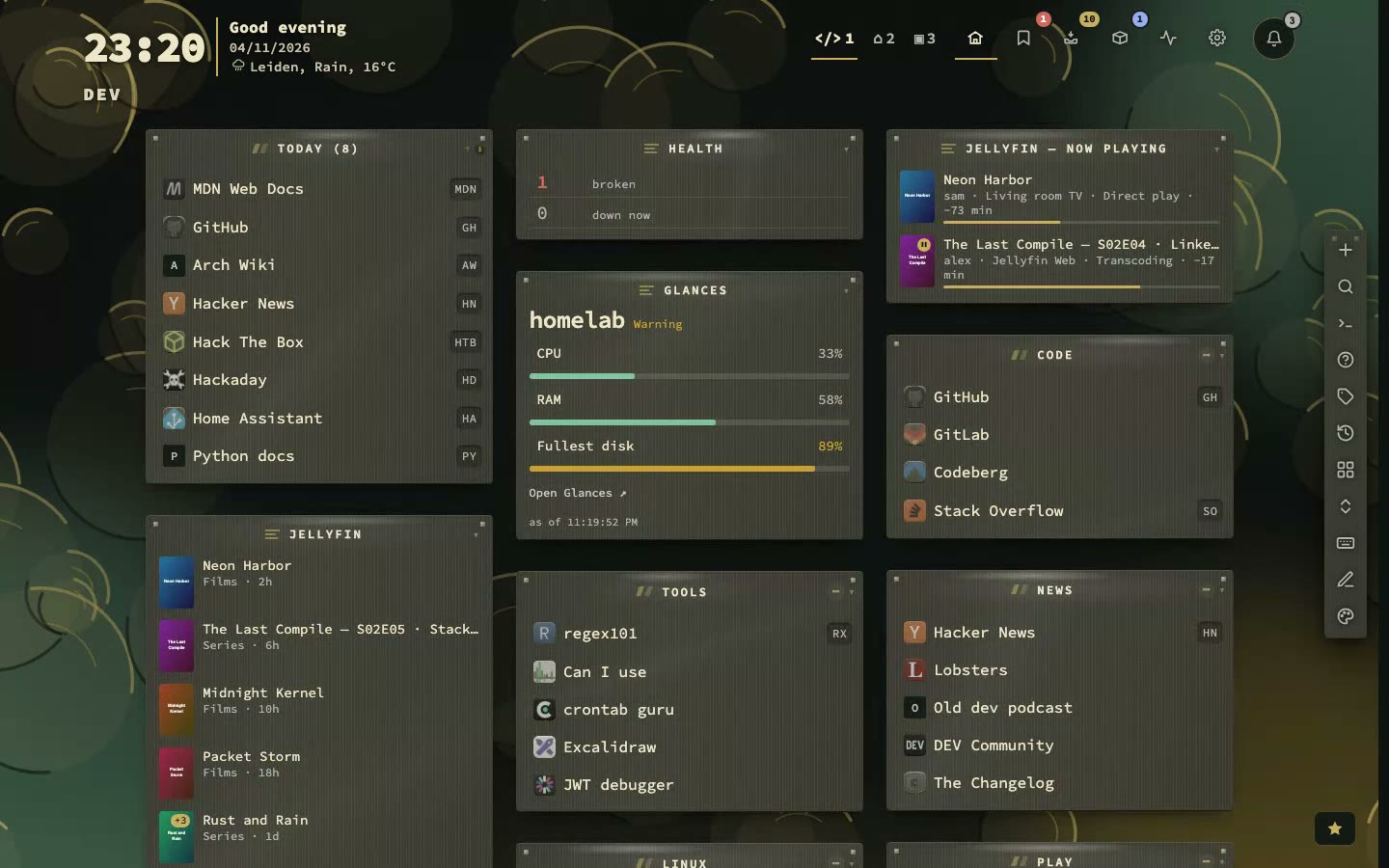
Glances shows how busy a machine is right now, but it forgets quickly. nextDash reads from a Glances 4 server and writes down what it reads, so the page can show an hour, a day or a month ago. It only reads and never changes anything on the machine.
- One section per screen: Overview, Processes, Containers, Disks, Network, Insights, History, Alerts and Hosts.
- Graphs, incidents and a forecast for when a disk will be full, worked out from the record.
- Several hosts in one table, and a link between a Glances host and the Containers view of the same machine.
- Shift+G opens it, and :glances opens a section or another host.
What the others do. Homepage has a Glances widget with many metrics and a graph, one block per host. Homarr has two widgets, one for resources and one for disk health. Dashy has a family of widgets with history charts, and Homer has a card with CPU, memory, swap and load. Glance, the dashboard, says in its own docs that other providers such as Glances may come. None of them documents a page with a record of its own, incidents or a forecast.
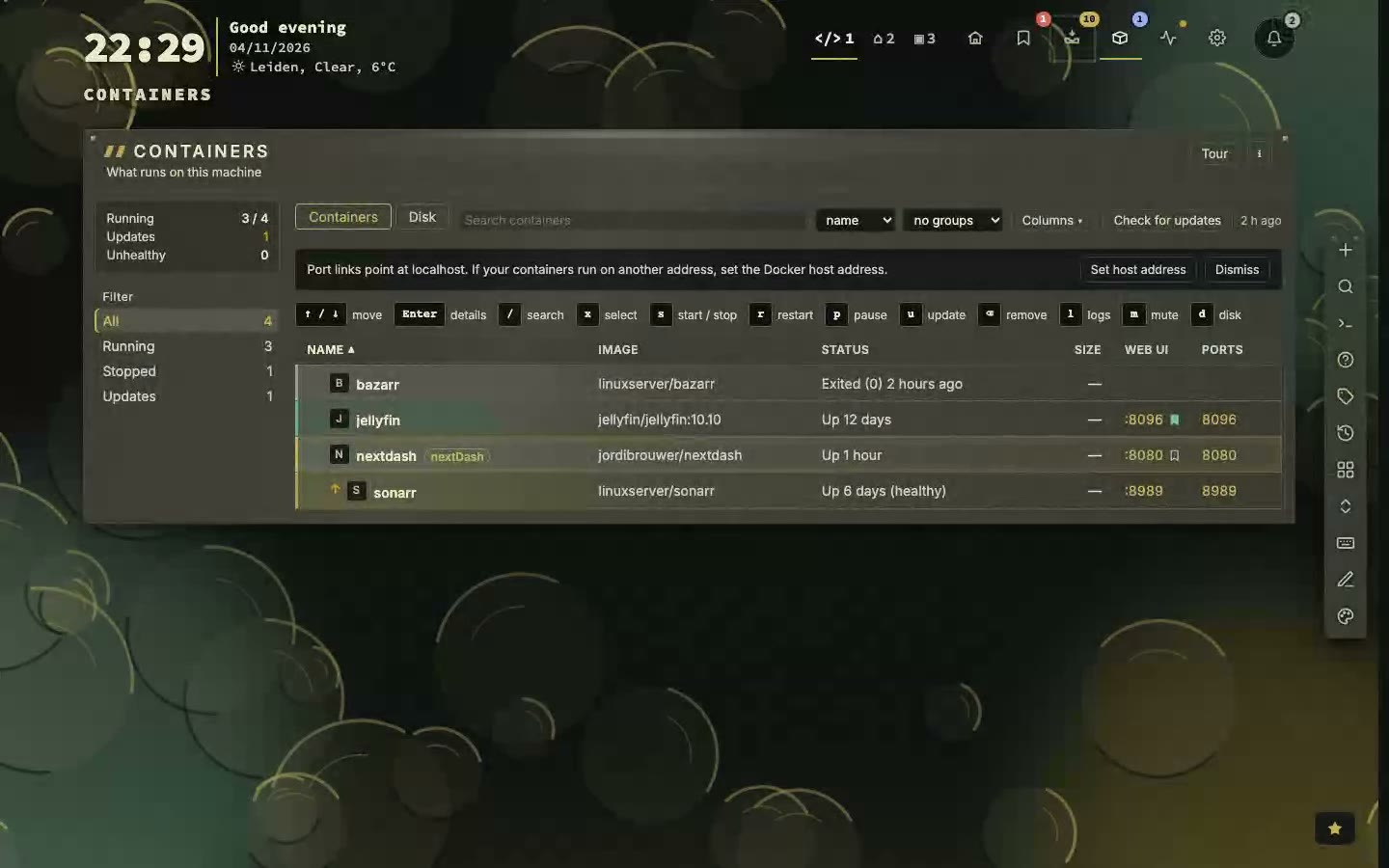
Containers you can act on
The Containers view shows the Docker containers on the machine nextDash runs on. Looking needs the Docker socket. Acting needs a switch you set yourself, and a write token as well if you use one.
- Filters for all, running, stopped and updates waiting, and groups by status, network, image or project.
- Start, stop, restart, update and roll back, one container or a whole stack, and logs from the keyboard.
- Each row knows its bookmark, matched in four steps, and shows a mark in the colour its checks give it.
- A Disk tab shows what Docker uses: images, volumes and build cache.
- Apps found on the server are offered as bookmarks, steered by labels.
What the others do. Homarr has the broadest widget of the others: logs, start, stop, restart and remove, and labels that create apps. Homepage shows status and statistics and finds apps from labels. Homer has cards with counts and with image updates, Glance shows status, and Dashy and Heimdall document no container features. Rolling back and Docker disk use are not documented in any of them.
An assistant you can check
The assistant answers questions about your bookmarks in plain words, such as which of my Docker bookmarks are down, or tag everything about Proxmox. It runs on a model you choose, and it is off until you turn it on.
- Claude, OpenAI, or a server of your own such as Ollama, so the questions can stay on your network.
- It sends something only when you ask, and what it sends is listed: your question, the last twenty messages, today's date, your page names and the answers of the lookups it made.
- It changes nothing by itself. A change is a proposal with Apply or Skip, checked again when you press it, and deletes and container actions are applied one at a time.
- The same group switches that govern the MCP endpoint decide what it may read and do.
- It answers questions about nextDash itself from the manual that ships with your install.
What the others do. Homarr has an assistant of its own (Shift+A, any OpenAI-compatible endpoint, changes need approval, conversations stored per user) and an MCP server. Homepage has an optional MCP server that reads and edits its configuration files and is off by default. Glance, Dashy, Heimdall and Homer document neither.
The tools, one by one
Homarr Dashboard
Good at. A drag-and-drop board you set up without YAML, with users, groups and permissions, 90 integrations, Docker control from a widget, a Glances integration, an MCP server and an assistant of its own.
How nextDash differs. nextDash is also a bookmark library, with tags, an inbox and link health, but for one person and without accounts. Where Homarr shows a service, nextDash also keeps a record of it: thirty days of checks, alerts, a Glances page with a history, and statistics of your own links.
Pick it when. Pick Homarr when several people share a board and you want permissions between them.
Homepage Dashboard
Good at. A fast start page written as YAML, with 164 service widgets, services that appear from Docker labels, a Glances widget, Quick Launch search and an optional MCP server for its config files.
How nextDash differs. nextDash is edited in the browser, keeps its bookmarks with tags, an inbox and checks, and can act on containers, not only show them, once you allow it.
Pick it when. Pick Homepage when you want everything in files you can version, and the widest list of services.
Glance Dashboard and feeds
Good at. A light dashboard of feeds: news, Reddit, YouTube, weather and markets, 28 widget types, from one small Go binary and a YAML file.
How nextDash differs. nextDash is not a feed reader. Watch feeds shows what is new on the sites you saved and keeps no articles. Its strength is the bookmarks and the server, not the feeds.
Pick it when. Pick Glance when the page is mostly a feed of the world, and you want one binary and little else.
Dashy Dashboard
Good at. A dashboard with a built-in editor or a YAML file, status checks on every item, about a hundred widgets for services and system stats, a Glances widget family, 40+ themes, and a login with several users.
How nextDash differs. nextDash adds a bookmark library, container control you switch on, stored uptime history and alerts, for one person without accounts. Dashy has more widgets for general information and more ways to sign in.
Pick it when. Pick Dashy when you want many widgets, several users and a rich visual editor.
Heimdall Application launcher
Good at. A launcher you fill in from the browser: type an app's name and its icon and colour appear; 155 apps show live stats; several users are supported.
How nextDash differs. nextDash also checks that services are up, sends alerts and, once you allow it, acts on containers. Heimdall supports several users and has few moving parts.
Pick it when. Pick Heimdall when you only want a tidy wall of apps with live numbers, for a household.
Homer Static dashboard
Good at. A static page from one YAML file: light, searchable from the keyboard, installable, with 57 smart cards for services and no database.
How nextDash differs. nextDash is edited in the browser and keeps a bookmark library with checks and alerts. Homer asks for less: no database and little to maintain.
Pick it when. Pick Homer when you want the lightest thing that can work, and a file you keep in git.
What nextDash is good at
- A bookmark library inside the dashboardTags with colours, an inbox to sort later, an Unsorted list for links with no page yet, and scheduled link checks.
- Statistics of what you useHow often you open each link, what you never open, how the collection grew and what to clean up, with a cleanup score and a CSV export.
- Health with a memoryThirty days of history, response times, certificates and domains, drift and soft-404 checks, maintenance windows and quiet hours.
- Alerts that leave the pagentfy, Pushover, Gotify, Telegram, Slack, Discord or a push on your phone, and signed webhooks for Home Assistant, n8n or a script.
- Containers you can act onStart, stop, update, roll back and read logs from the keyboard, update a whole stack, see Docker disk use and which bookmark belongs to which container.
- Glances with a recordA page that keeps what Glances forgets, with graphs, incidents and a forecast for filling disks, across several hosts.
- An assistant you controlClaude, OpenAI or your own model; it proposes and you press Apply, and the same switches govern the MCP endpoint.
- News from the sites you savedWatch feeds finds the feed of a bookmark's site, counts what is new since your last visit and can send it to a webhook, without storing articles.
- A search that does moreA command palette with a key for every action, sums and unit conversions, and finders of your own.
- Light to run, safe to changeOne container, plain JSON files and about 60 MB of memory when idle, automatic backups, a 30-day trash and earlier layouts of every page you can restore.
When another tool is the better choice
- Several people share one boardHomarr, Dashy and Heimdall have accounts. Homarr adds groups and permissions. nextDash is for one person.
- You want everything in filesHomepage, Glance and Homer keep their setup in YAML you can put in git. nextDash edits in the browser and keeps JSON files.
- You want the most service widgetsHomepage lists 164 service widgets, Homarr 90 integrations and Dashy about a hundred widgets. nextDash has 51 widget kinds and 41 services for the Custom widget.
- The page is a feed of the worldGlance is built around news, Reddit, YouTube, weather and markets. nextDash shows what is new on your own sites.
- You want the lightest thing possibleHomer is a static page and Glance one small binary. nextDash is one container with about 60 MB idle.
Checked on 4 November 2026 against each project's own documentation, README, compose file and source, and where those say nothing, against articles, forum answers and issue threads. Tools change quickly; something marked not documented may well exist. Spotted a mistake? Tell us in the discussions.