nextDash v1.26.0 — a notifications bell, a large clock and a lighter start
nextDash v1.26.0 gives everything that needs you one place to wait: a notifications bell in the navigation bar. The release also adds a large clock with a greeting by name, a Clock widget with a face, AdGuard Home and Pi-hole widgets, and a much lighter start.
The notifications bell
Questions and notices used to appear over whatever you were doing. They now wait in the bell, the last button on the right of the navigation bar, and a badge counts what is unread.
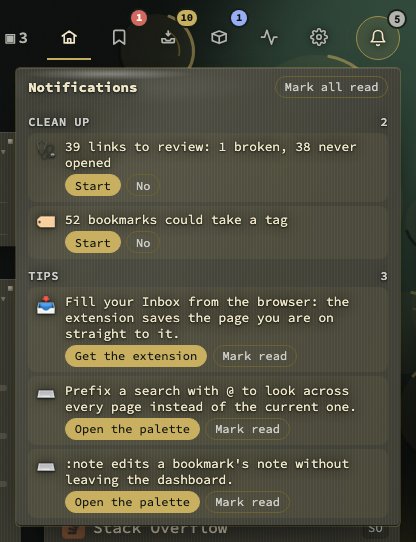
Rows are grouped as Health, Clean up, System, Privacy and Tips, and each carries the button that answers it. No answers a question for good and the row slides away. Mark read clears a row, and Mark all read clears the lot.
Maintenance and privacy questions, notices that no longer toast (an update was installed, a new release is out, an outage), the weekly digest and two tips a day wait there. A new pair of tips comes each calendar day, whether or not yesterday’s were read, and each has a button to the place it is about.
The bell shakes and pulses when something new arrives, with a short tone. Bell sound for new notifications under Config → Behavior → Privacy & sync switches the tone off. Bring back dismissed notifications in the same place puts every answered No and every read row back. The few offers that need an answer on the spot, such as the apps found on your Docker host, still appear as a card in the bottom-left corner. A first-time note says what the bell is, once.
Two bugs are fixed on the way. Pressing the coloured button of a row (Start, Open the Inbox) slid the row out, but it was back the next time the bell opened. It is now put aside until it gets worse, the way No does. And Keyboard tips come (a day or a week) is gone from Onboarding, because the bell holds two tips a day whatever it said.
A large clock and a greeting
The clock placement Large clock, greeting beside it draws the time large in the classic header, with the greeting on its side. Fill in Your name under Config → Appearance → Date & weather, in the new Greeting group, and the first line reads “Good evening, Jordi”; it changes with the hour. Leave it empty to be greeted without a name.

Widgets
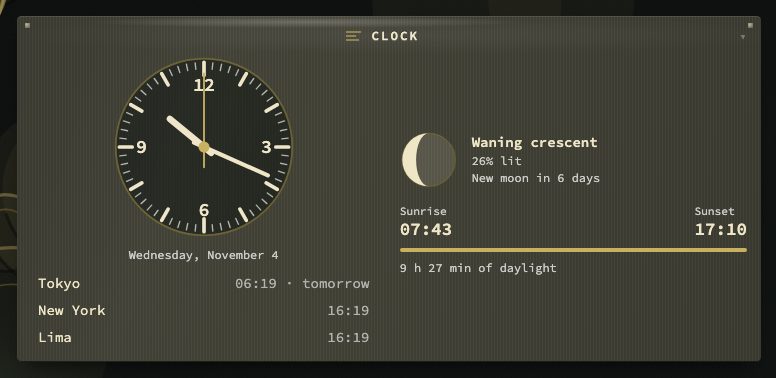
The Clock widget has a face: a large analogue clock with a seconds hand, other places listed under it, the moon with its phase, and sunrise, sunset and daylight for your weather location. The Countdown now shows its figure large, with the date under it.
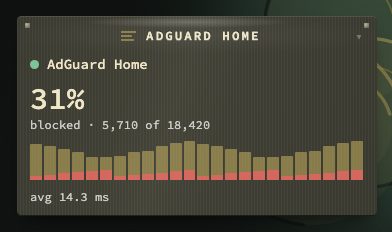
AdGuard Home and Pi-hole have a tile each, on the shared media base. They show queries, how many were blocked, the last day by the hour, and the top blocked domains and clients, in four looks: Pulse (the default), Leaderboard, Tiles and Mix.
A lighter start, and a new default look
The theme stylesheet shrinks from 9.4 MB to 379 KB and media tiles show their last answer while the new one loads. A new install starts on Tarnished Brass; installs that already chose a theme keep it.
Smaller changes
- A factory reset now forgets the weekly digest.
- Fix first in the collection health list names a shared address once.
- The last Appearance tab you click is the one that stays.
Upgrading
Pull the new image:
docker pull ghcr.io/jordibrouwer/nextdash:latest
# or
docker pull foobar1452/nextdash:latest
On Unraid, update the container from the Docker tab. No settings change is needed. The full list is in the GitHub Release, and the bell is described in the manual.