Assistant and MCP
Newsince v1.23 · 30 Oct
Ask in plain words. Changes wait for your click. Your own key, or your own model.
- :ask Ask the assistant from the command palette
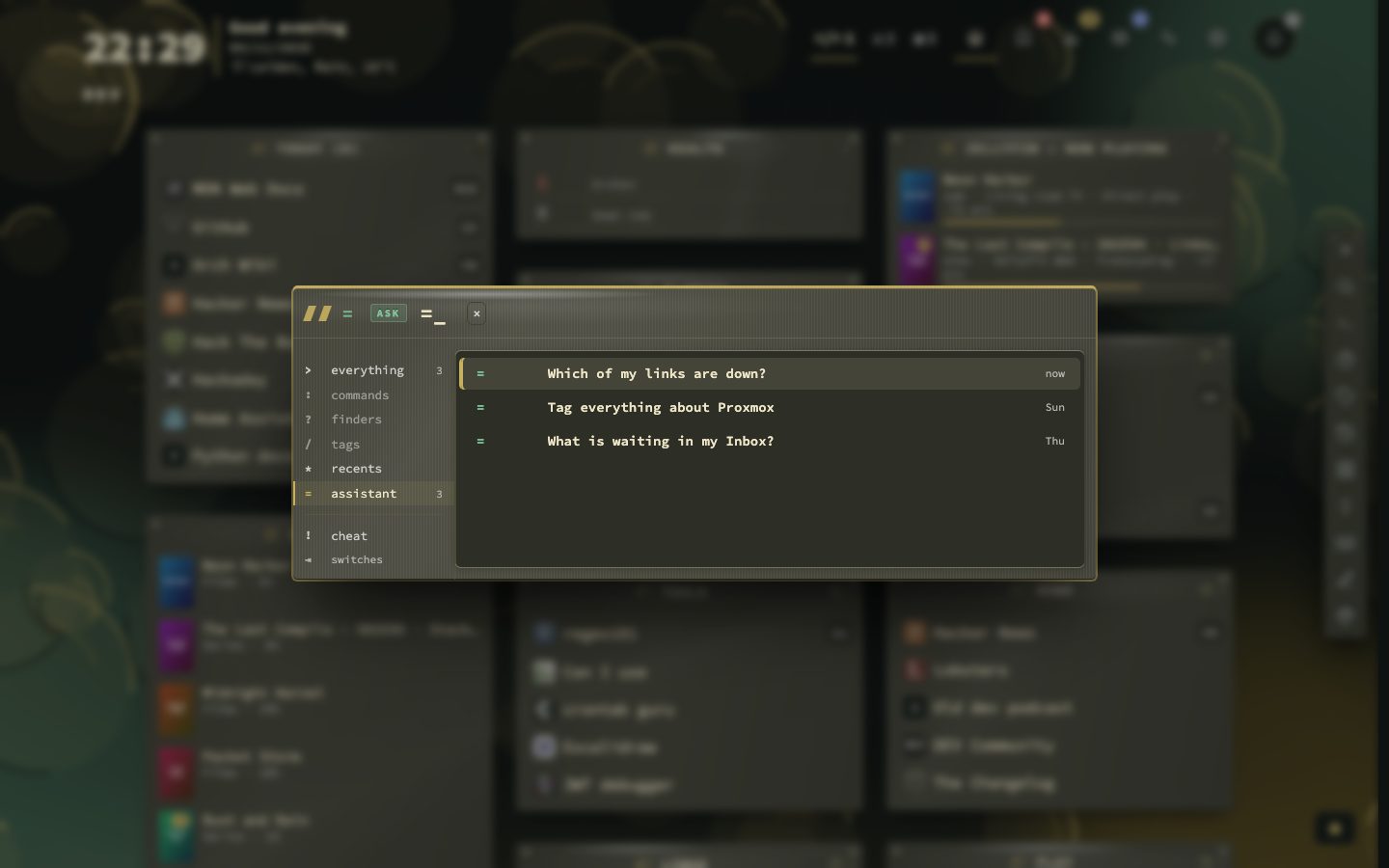
- = List your conversations, or ask in the search bar
The assistant answers questions about your bookmarks in plain words: which of my links are down? or tag everything about Proxmox. It runs on a model you choose: Claude, OpenAI, or a server of your own such as Ollama. It is off until you turn it on, and nothing is sent to the provider until you ask a question.
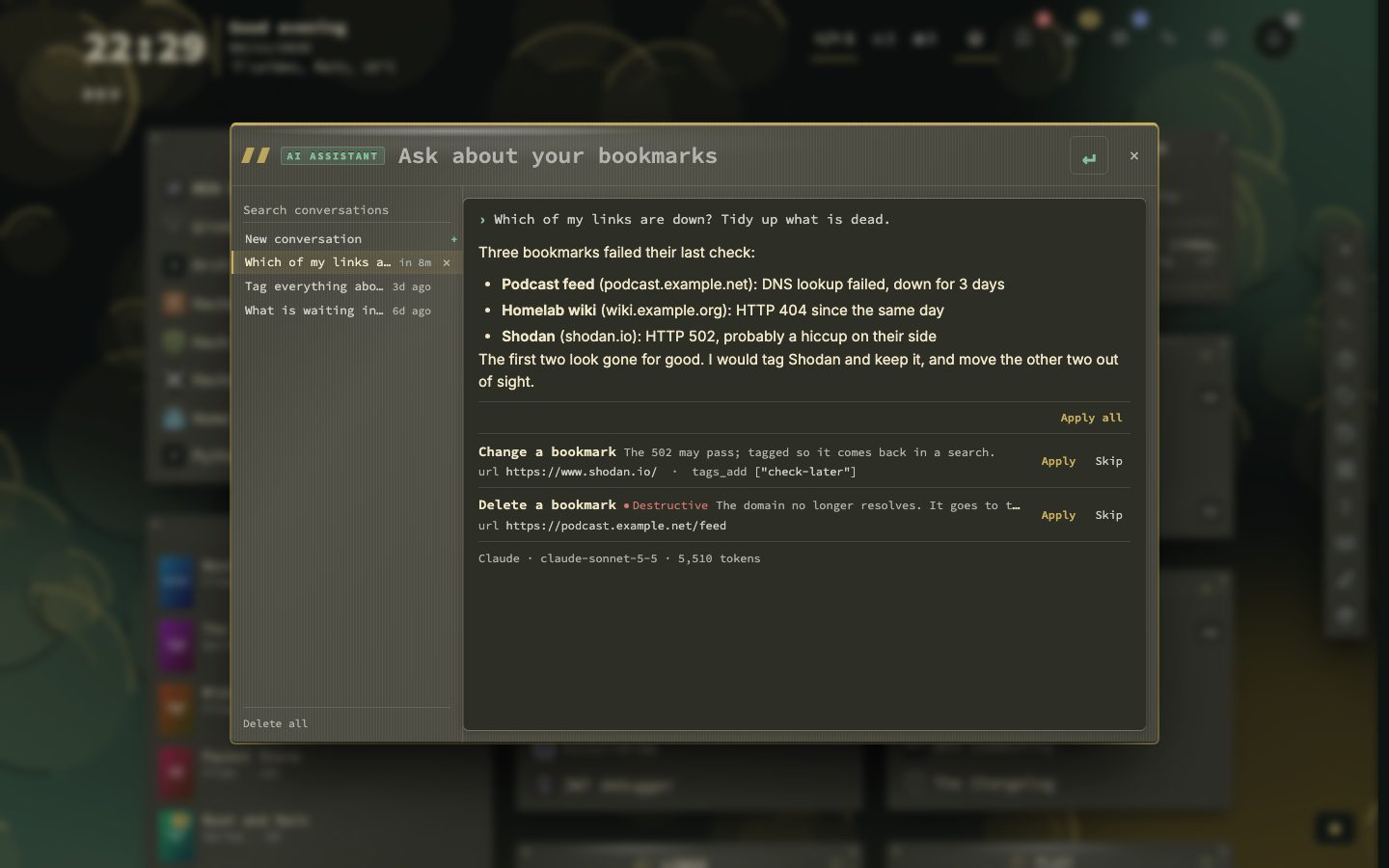
It looks things up by itself and can read the same things as the MCP endpoint: bookmarks, tags and pages, and, when you allow it, Health, the Inbox and your containers. It never changes anything on its own. A change it wants to make appears under its answer as a proposal, with the reason, and nothing happens until you press Apply. A deletion is marked, and goes to the Trash.
Try it
- Open Config, then AI Assistant. Tick Turn the assistant on, pick a provider and save its key. The key stays on your server and is never shown again.
- Press : for the command palette, type
askand your question. Or type=in the search bar. - Read the answer. Press Apply on the changes you want, or Skip.
Conversations
Type = on its own in the search bar to list your latest conversations, and press Enter to open one. What follows the = is never stored in the search history. Conversations are kept on your server, the newest 50 for 90 days by default, and you can delete one or all of them.
Settings
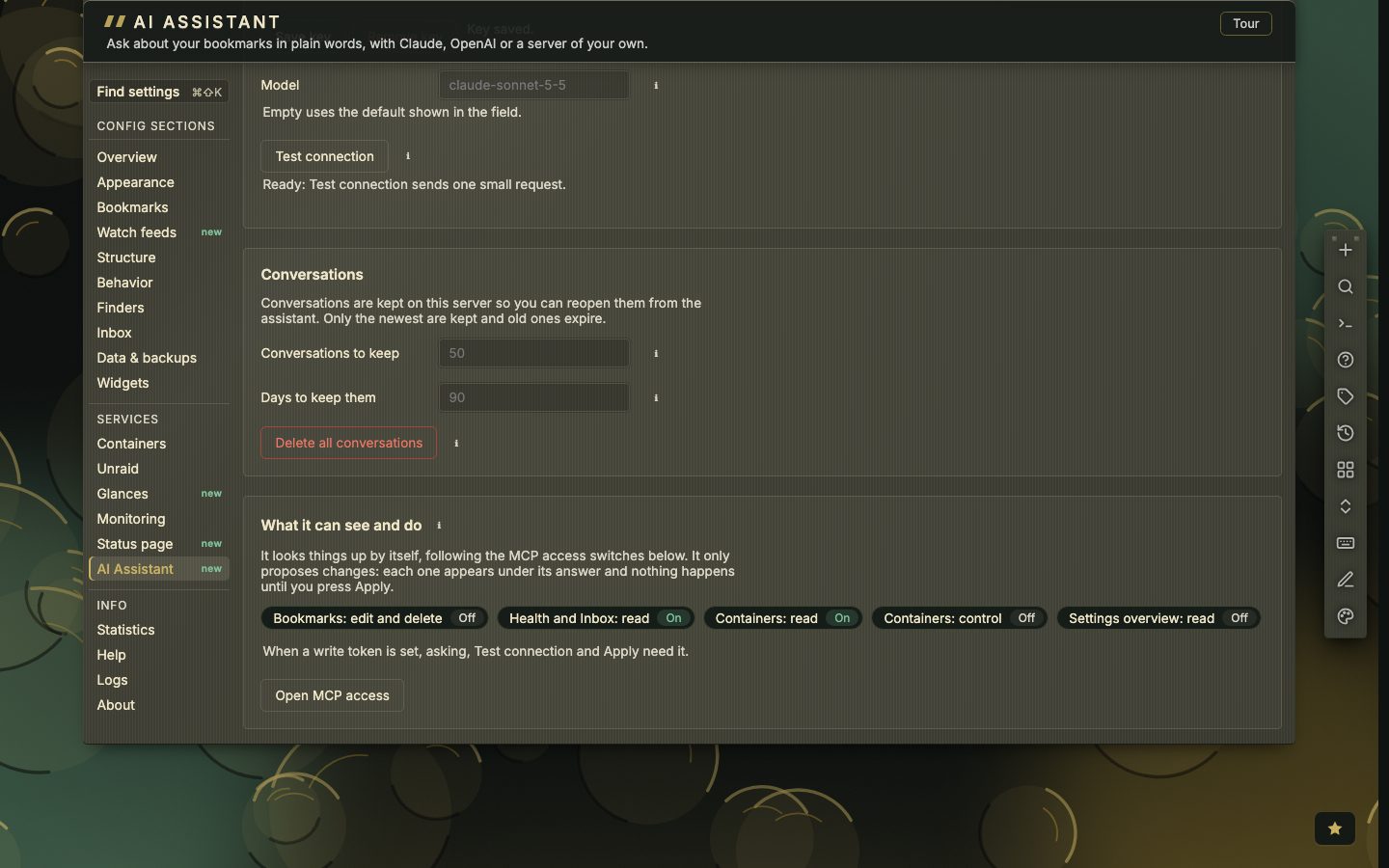
One page under Services holds the switch, the provider, the key, the model, how long conversations are kept, and a Test connection button. A last panel shows what the assistant can read, following the MCP switches.
MCP
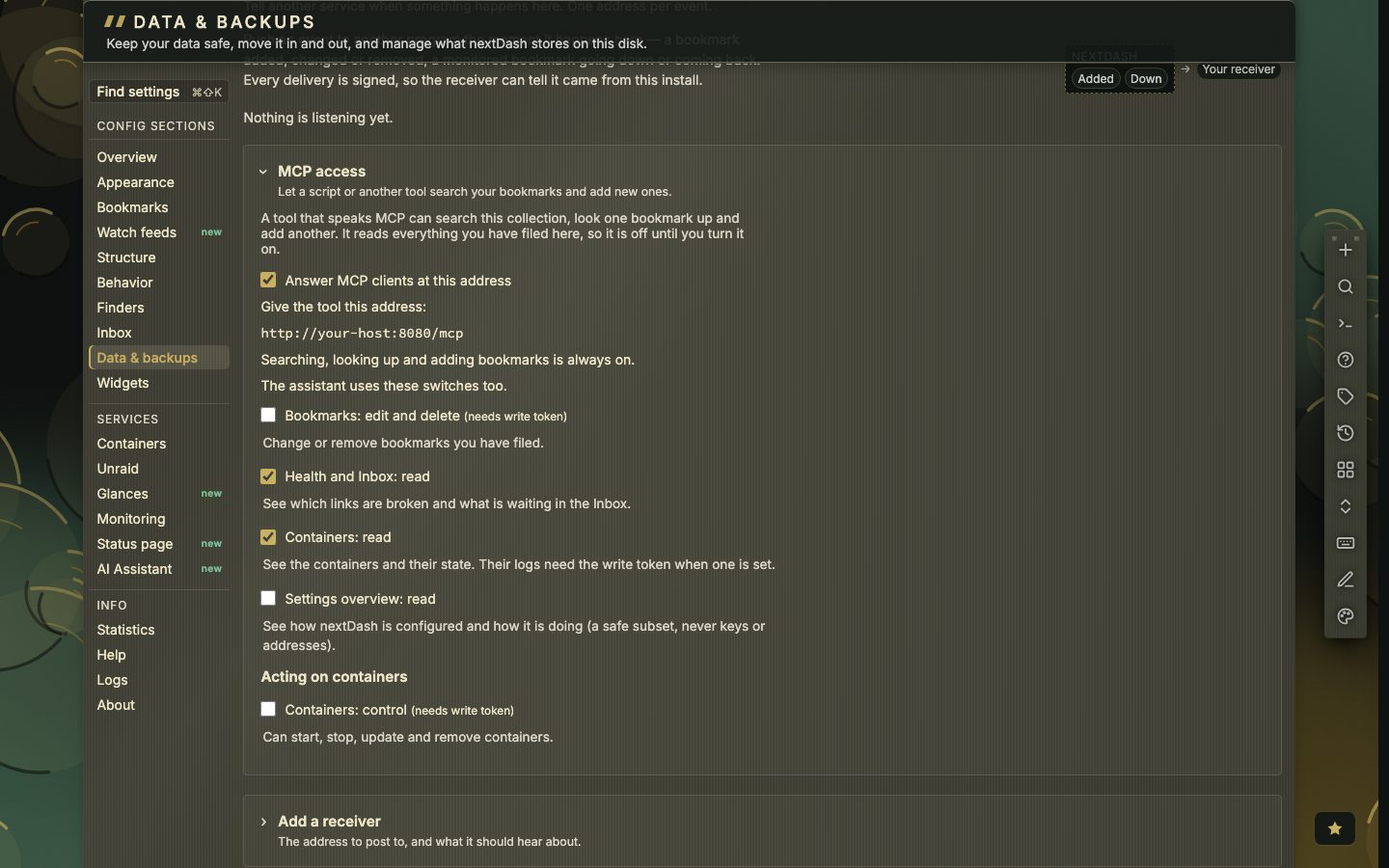
nextDash also answers MCP clients at /mcp, so a tool such as Claude Desktop or your editor can search and add bookmarks. It is off until you turn it on under Data & backups, then Webhooks, then MCP access. Five group switches add more: editing and deleting bookmarks, reading Health and the Inbox, reading containers, reading a safe overview of your settings, and controlling containers. Editing and controlling need the write token. A deleted bookmark goes to the Trash. The assistant follows the same switches.
How a question goes
- 1Type your question and press Enter
- 2The assistant looks things up in your data
- 3It answers in a short layout: one sentence, then the detail
- 4Proposals for changes appear under the answer
- 5You press Apply or Skip on each one
The panel is laid out like the command palette. You type in the line at the top, Enter sends and Shift + Enter starts a new line. Your conversations are listed on the left and the open one is shown on the right. With the question line empty, ↑ and ↓ walk the list, Enter opens a conversation and Esc closes the panel. Answers are shown as Markdown: lists, code, tables and links that open a page of nextDash, such as Config, then Containers, without leaving the dashboard.
Choosing a provider
- Claude needs an API key. The model is optional: left empty, nextDash uses its built-in default, shown as the placeholder of the field.
- OpenAI needs an API key, with the model optional in the same way.
- OpenAI-compatible, such as Ollama or LM Studio, needs the server address, for example
http://ollama.lan:11434/v1, and a model. The key is optional, since most home servers take none, and local and LAN addresses are allowed here.
Save key keeps the key in data/ai-secrets.json, apart from your settings. It is never shown again, only Key saved, and Remove key deletes it. A key is kept per provider, so switching back and forth does not lose one. Test connection sends a tiny request and reports the model it used or what went wrong. A line under it says what is still missing, such as no key or no model.
What the provider receives
Only when you ask a question or press Test connection. There are no background calls. A question carries:
- your question and the earlier messages of that conversation (the last 20);
- today’s date and the names of your pages;
- the answers of the lookups the assistant makes for that question, for example the bookmarks a search found.
Not your whole collection, and not your settings, unless Settings overview: read is on and it looks them up, and then only the safe subset the manual describes.
What it can read and what it knows
It reads through the same group switches as the MCP endpoint. Searching and looking up bookmarks, tags and pages is always available. With Health and Inbox: read on it can answer counts and rankings, such as which bookmarks have the lowest health score, and how one bookmark has fared day by day. With Containers: read on it can say which container belongs to which bookmark. When a switch it needs is off, it says which one.
Ask it how something works or where a setting lives, and it looks the answer up in the manual and the README that ship with your install. That lookup happens inside nextDash and sends nothing to the web. Where the manual does not say, it tells you so rather than guessing.
Proposals, one by one
A proposal is one row per change: a bookmark to add, edit, move or delete, a category to create or rename, or a container action. Each row shows what would happen and why. Adding is always possible, editing, moving, deleting and categories need Bookmarks: edit and delete, and container actions need Containers: control. The change is checked again when you press Apply: the group must still be ticked. Apply all applies the pending changes of an answer in one go, but skips deletes and container actions, which you apply one at a time. A failed change can be tried again or skipped.
Limits and cost
- 8rounds of lookups at most
- 20lookups at most
- 2minutes per question
- 50conversations kept by default
- 90days kept by default
If a question hits the rounds or the lookups, you get the partial answer with a line saying where it stopped. If the two minutes run out, the whole question is dropped and you see The provider took too long to answer. A provider error saves nothing and puts your question back in the box. Every answer shows the provider, the model and the tokens it used, so you can see what a question costs on your account.