nextDash v1.28.1 — Jellystat, Bazarr and Prowlarr widgets
nextDash v1.28.1 adds three widgets under Media: Jellystat, Bazarr and Prowlarr. Each has its own address and API key, a Connect step and parts you can switch off.
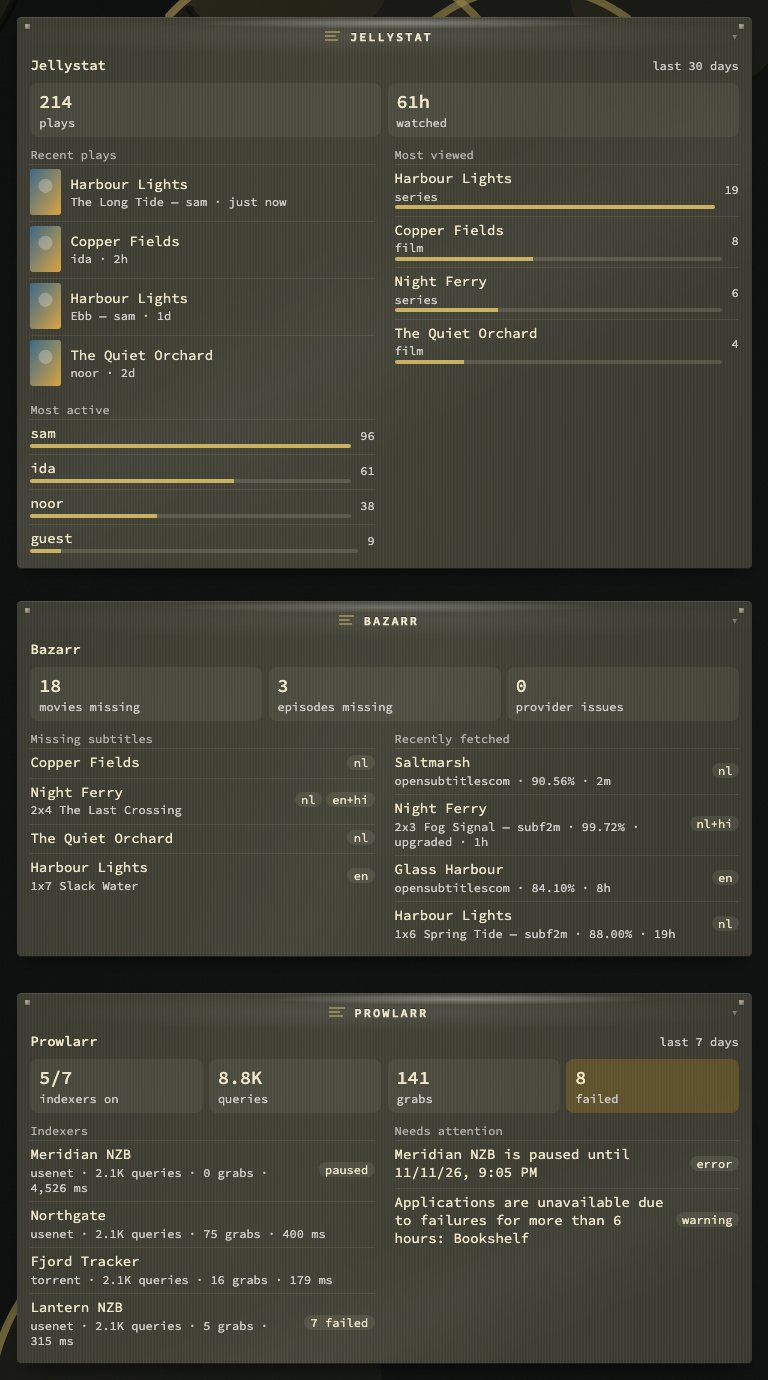
Jellystat: who watched what
Jellystat keeps the history Jellyfin does not. The widget shows the recent plays, the most viewed titles, the most active people and a line of totals over 1 to 365 days. The key comes from Settings → API Keys. After Connect it offers your libraries; only the totals and the recent plays follow that choice.
Bazarr: which subtitles are missing
The widget lists the movies and episodes that still miss a subtitle, with the language wanted (nl, en+hi, en+forced). Movies and episodes take turns, so a long film backlog does not hide the episodes. Beside it come the subtitles fetched lately, with provider and score, and a line of totals with the providers in trouble. The key is under Settings → General → Security.
Prowlarr: how the indexers are doing
The widget shows the indexers that are on, with their queries, grabs, failures and average answer time, a paused one first, and lists what needs attention: Prowlarr’s health messages and the indexers it has paused. It never reads Prowlarr’s history, which holds every search address with its key.
A figure a service could not give shows as a dash, never as a zero.
Smaller changes and fixes
- The Go toolchain is now 1.26.11, which fixes GO-2026-6859 in
net/http.
Upgrading
Pull the new image:
docker pull ghcr.io/jordibrouwer/nextdash:latest
# or
docker pull foobar1452/nextdash:latest
On Unraid, update the container from the Docker tab. No settings change is needed. The full list is in the GitHub Release; the widgets are in the manual.