Outgoing and trust
What nextDash sends out, and how to run it safely.
Your bookmarks are a map of what you care about, and that map should live on your own disk. nextDash has no user accounts and is built for a trusted network. Do not expose it directly to the public internet. Run it behind a private overlay network such as Tailscale, behind a reverse proxy with authentication, or bound to localhost.
Two tokens do two jobs: one protects every destructive endpoint, the other opens capture and nothing else. The API answers this dashboard by default, not every site open in your browser.
nextDash can also push out. Outgoing webhooks are signed with the Standard Webhooks scheme and cover a bookmark added, changed or removed, a monitored bookmark going down or coming back, certificates and domains about to expire, and news from watched feeds. The assistant endpoint is off until you switch it on.
Try it
- Set a write token in your compose file.
- Open Config, then Data and backups, then Webhooks, and add an endpoint.
- Check what you have switched on under Config.
What the write token stops
- 8webhook events
- 2tokens
- 0user accounts
With NEXTDASH_WRITE_TOKEN set, every write or destructive request needs the header X-NextDash-Token: saves, imports, deletes, uploads, resets, backups and container actions. The dashboard supplies it automatically for pages served by the same install. The token keeps out requests that do not come from that page: another website firing requests at your network from a tab you have open, and scripts or scanners that only know the address.
Use a long random string, for example the output of openssl rand -hex 32. Without the token, the settings come back without the stored keys and tokens, and the server log is closed. A backup needs the token too, because a backup is the whole library. The data folder itself is never served as a website.
A setup for a LAN or a VPS
- 1Set a long random NEXTDASH_WRITE_TOKEN
- 2List your own address in NEXTDASH_CORS_ORIGINS
- 3Turn on the activity log with NEXTDASH_ACTIVITY_LOG
- 4Put nextDash behind Tailscale or a proxy with authentication
Which names may open it
With a write token set, nextDash also refuses a request that names a host it does not know, because a page on another domain could otherwise point its own name at your address and hand itself the token. An IP address, localhost, a name without dots and the private endings .local, .lan, .home.arpa, .internal and .ts.net always pass. For a public name, list it in NEXTDASH_ALLOWED_HOSTS, comma-separated. A refused request gets Host not allowed, status 421, and the reason is in the log.
Local addresses and outgoing requests
Allow localhost & private-network bookmarks under Behavior, then General, is on by default. Turn it off when nextDash is reachable on a shared network. The server’s pings, previews, icon downloads, alerts and webhooks then only reach public hosts. Addresses are checked again when the connection is made, and a resolved public address is pinned for about two minutes, so a host name cannot switch to a private address in between. The requests the server makes for you are rate limited per client, and above the limit the API answers 429.
What nextDash contacts
- The sites of your bookmarks, for checks, previews, icons, watched feeds and archives, each with its own switch.
- The GitHub Releases API once a day, to see whether a newer release exists.
- The nextdash.cc feed every 90 minutes, for the posts in News & features.
- Your own services, for custom widgets, webhooks and alerts.
- Your assistant provider, only when you ask a question or press Test connection.
- The install count, once a day: a random install id and the version, and on Unraid the word Unraid. It is on by default and has a switch under Behavior, then Privacy and sync.
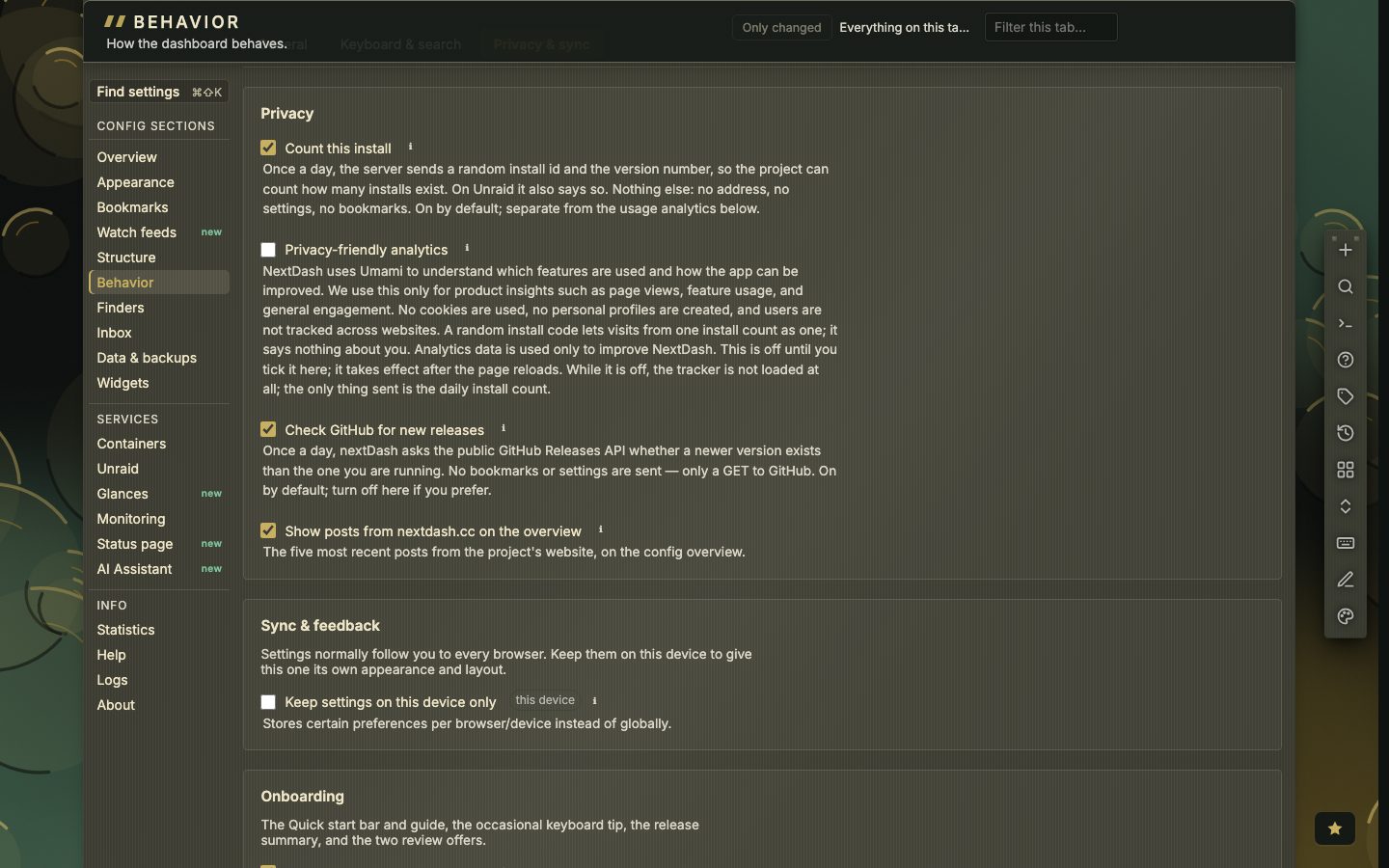
Analytics is off until you turn it on. When it is on it records event names from a fixed list with bucketed counts. It never records bookmark names, URLs, search text, page or category names, notes, tag names or any address, and it sets no cookies.
How a webhook is signed
Add a receiver with a name and an address and tick its events: bookmark.added, bookmark.updated, bookmark.deleted, health.down, health.up, health.cert-expiring, health.domain-expiring and feed.news. Nothing ticked means all. Every delivery carries the headers webhook-id, webhook-timestamp and webhook-signature. The signature is HMAC-SHA256 over the id, the timestamp and the payload. The signing key is shown once, when you save, and starts with whsec_, so the official Standard Webhooks libraries can use it as it is.
A failed delivery is retried twice and then dropped. A 4xx answer is not retried and redirects are not followed. Send a test posts one delivery and shows the status.
MCP stays closed until you open it
The MCP endpoint at /mcp is off until you tick Answer MCP clients at this address. Five group switches add editing and deleting, health and inbox, containers, a settings overview and container control, all off until you tick them. There is no sign-in on it yet, so do not put /mcp on a public address: anyone who can reach it can use every tool you switched on.