nextDash v1.31.0 — compose stacks, bookmark reminders and related links
nextDash v1.31.0 puts docker compose stacks inside the Containers view. Bookmarks learn two new habits, a reminder you set yourself and a row of related links on the preview card, and the notifications bell stops being easy to ignore.
Compose stacks in the Containers view
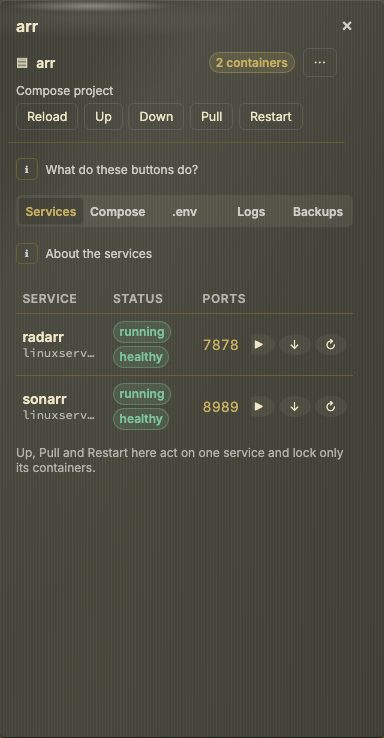
With Group by project on, each stack heading has a Files button, and a container’s panel links to its stack. The stack panel opens on the services, each with round Up, Pull and Restart buttons that act on that one service. Other tabs hold the compose file, the .env, one log for the whole stack and the backups.
NEXTDASH_COMPOSE_MAP (hostPrefix:containerPrefix) says where a stack folder appears inside the container; mount it read-only to look, read-write to edit. Passwords, tokens and keys show as ••••••, and Reveal fetches one value at a time.
With NEXTDASH_DOCKER_CONTROL=1 the files become editable. Check runs docker compose config on the text in the box, saved or not, and marks the line it names. Changes shows the difference with the file on disk, and Apply checks, saves and runs Up. A file that changed on disk meanwhile is never overwritten, and every save keeps a copy under Backups.
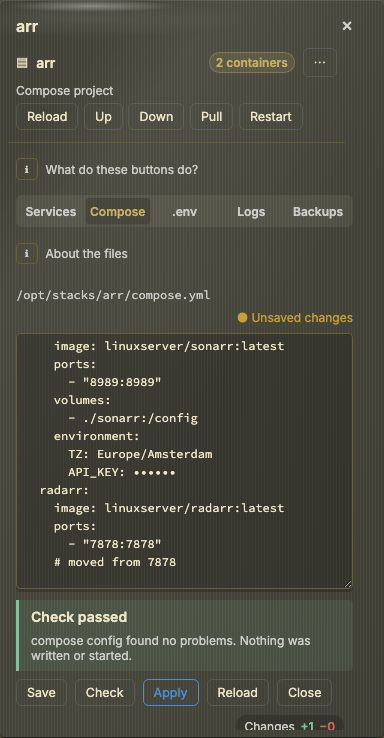
Up, Down, Pull, Restart and Pull and Up run docker compose in a short-lived helper container, with the output streaming as it does for an update. Down asks first and never removes volumes, and Up stops before it starts when a variable the files use is set nowhere. A stack whose file changed after its last Up shows Edited, not applied.
Reminders on bookmarks
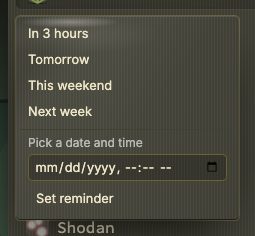
Press z on a bookmark, pick Remind me… in its right-click menu, use the edit form or type :remind tomorrow. Presets run from three hours to next week, or pick your own date and time.
When the time comes, the bell gets one quiet row that names the oldest reminder due and counts the rest. Done clears it, Later picks a new time and Open opens the link. While nextDash is closed, the server pushes a due reminder once; a switch under Config → Monitoring → Notifications → Browser notifications turns that off.
Related links on the preview card
The preview card of a bookmark now ends with up to three of your other bookmarks that go with it. They are ranked on shared tags, the site and links you open together, and a tag or site counts for less the more of your library carries it.
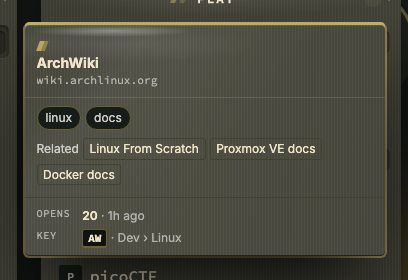
Point at a link to see why it is there. The right-click menu and :related list the same links, and the row can be switched off under Config → Appearance → Previews.
A bell that calls more often
While something is unread, the badges now pulse every 20 seconds and the bell shakes every 90, until the rows are read or answered. The tone sounds at most once in five minutes, however many sources arrive, and a second tab or a reload does not add one.
Smaller changes
- Shift + V opens What’s new.
- A tag typed in full now ranks its bookmark first in search.
- Dropping text that is not a link onto the dashboard no longer makes Firefox leave the page.
- The bell drops Immich failures once they are cleared, also with Status tiles on two pages for one server.
- Closing the progress window of a failed compose run no longer closes the stack panel with it.
- The public demo’s Docker has five compose stacks you can read, edit, check and run.
Upgrading
Pull the new image. Compose stacks stay off until NEXTDASH_COMPOSE_MAP is set.
docker pull ghcr.io/jordibrouwer/nextdash:latest
# or
docker pull foobar1452/nextdash:latest
On Unraid, use Check for Updates on the Docker tab. The full notes are in the GitHub Release.